
orientation

The art of empathetic library induction...

For as long as I can remember I’ve been in charge of my library’s Induction / Orientation process for new students, and it has evolved over the years into a fairly well oiled machine. We treat the whole thing as a marketing campaign, designed to maximise the chances of the students taking in our key messages.

Our Induction Group is full of brilliant staff from all different areas of the Library and Archives. There are specific aspects of what we do that I’d really recommend to all academic libraries, as they are sympathetic to students who are at constant risk of overwhelm as they enter the new University environment. Here are our key guiding principles for the art of empathetic library induction…

1 Don’t try to tell them everything

The most important part of an empathetic induction is putting the students’ needs above your own as a library - which is hard to do! But trying to get students to know all the things we need them to know simply does, not, work. There is too much information to ingest in too short a space of time.

I don’t like cliches about librarians but I’m willing to accept we do have a habit of trying to tell everyone, everything, all the time. When you’re brand new to a City, you’re sat next to someone you’re living with for the next year but only met for the first time last night, you’re finding out how your course works and where you need to go for lectures, and a whole new world is opening up, you just don’t have room for the different types of ebook availability.

So the key is to accept we can’t tell people everything, and move towards a model of BEGINNING a conversation. Tell the students the very essentials, and ensure the library is friendly enough that they come back and ask us more questions later. Induction is the start of the relationship, and not the whole thing.

2 Use week by week themes across multiple platforms

One of the easiest ways to make complicated information easier to digest is to cascade it across a period of time, in clear chunks - rather than using the same period of time to talk about everything all at once. Over the years at York we’ve got this down to a fine art, and we have five (or, arguably, six) themes that form the focus of our comms across the opening weeks of Semester:

  • Week 0 (Welcome week): general welcome info - the fundamentals.

  • Week 1: This is your space. A summary of the library buildings and how it all works.

  • Week 2: Our resources are easy to use. Book borrowing, eresources, subject support.

  • Week 3: We’ll help you develop next level skills - study skills, digital skills, academic skills.

  • Week 4: You’re part of a supportive community. All the ways you can get in touch, get help, support and guidance.

  • Week 5: Unlimited Possibilities. All the stuff you might not expect from the library if you’ve not been paying attention - digital labs, maker space, podcasting studio, archives, art collection and so on.

All these are summaries on our New Students Quick Start Guide, and then each week’s theme is distributed across various channels in various ways. These include vertical welcome screens in each library building, regular digital screens, a banner in YorSearch (the library catalogue), articles on the library website, and social media posts. Here’s an example of some of the Week 0 general welcome themed messages:
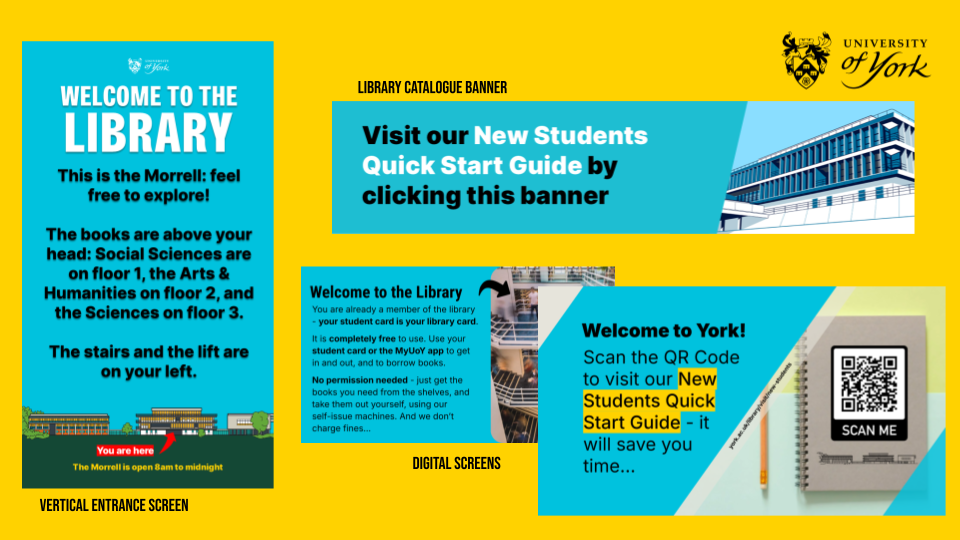
A catalogue banner and digital screens giving basic welcome info about the library

3 Speak to people face to face

We attend as many face-to-face induction sessions within Departments as possible, usually with someone from the Library Skills Team (which I co-manage) representing the entire Library. We have three versions of our Welcome Slides, aimed at Undergrads, Postgrads and Articulation Students respectively - it’s important not to take a one-size fits all approach, and we also have separate welcoming guidance for York Online students.

We also attend various welcome fairs, and run a welcome stand in the entrance of the library each lunchtime for Weeks 0 and 1 - this year we spoke to just under 1,000 students as part of this. All these interactions are essential in establishing the kind of relationships where students feel empowered to come back and ask more questions later.

4 Prioritise social media

Our social media numbers are exponentially higher than any other means we have of getting people information. Whilst the library website or the Subject Guides allow for nuance and depth, we know that not nearly as many people will see them than will see a successful Instagram post.

For us this year an important part of the general welcome was telling people that Careers & Placements had moved in to our building for 2026/27 - so I absolutely optimised the Instagram post about it (e.g. made it a carousel with music added, made it a collab, added text natively in Insta, etc etc) and thankfully it has now reached over 13,000 people (with over 30k views in total) - there’s simply nothing comparable available to me for getting the word out there.

5 Sneak in useful things for returning students

All of our info for new students is designed to be equally applicable to existing students who may have missed things first time around… We’re trying to give them fundamentals about how things work without making them feel silly for not already knowing - and in addition to this we produce specific guides for returning 2nd and 3rd years too.


By taking this joined up approach to induction we hope our students feel welcome above all. We hope they feel like the library is truly theirs. And we hope they know enough to get started, and to come and ask us when they need greater detail…

Import your floorplans into Prezi to create an interactive map

A couple of years ago I wrote about some interactive maps we'd made of the Library, which we used for induction and teaching - they went down very well. The students are much more engaged by a slick Prezi than a tired PowerPoint, and it's also very practical to have information about the library geographically located in a map, rather than in linear slides. So the maps worked really well as stand-alone web objects to be viewed independently by students and staff, as well as actual materials for live presentations and workshops. You can read the post - Student Induction, Libraries, Prezi, and Interactive Maps - here; it also contains an embedded Prezi map, with which to compare the new version I've created below.

In 2012 we tried to improve the maps a little, including embedded a lot of videos in them - things like the virtual tour, but also information at the point of need, for example '1 minute on... how to photocopy and scan' next to where the printer/scanners are on the map.

This year, we did something I've wanted to do from the start, which is import floor plans to Prezi and create the maps based on those. Previously we simply didn't have good enough floor-plans in a format I could use - hence having an outline of the Library buildings (drawn by someone in the Digital Library team), somewhat awkwardly divided up by me using lines and boxes. Now though, we have a MUCH better interactive map, the basis of which is an imported PDF of our floor plans.

Here is the generic map we display on our Info for New Students page (as always I'd recommend going into Full-Screen mode to view this - press the Start Prezi button then once it loads, click the box icon in the bottom-right corner):

We experimented with various ways of representing the different floors: separate maps for each floor, or one map but with box-outs containing the other floors, for example. In the end we opted for making the ground floor plan of the overall building take up most of each ground floor, but with the other floors contained within the same space. (That doesn't make much sense; you'll see what I mean if you look at the map.)

Unexpected benefits

Once again the response from the students was really good. Quite a lot of our induction talks happen as part of wider introductions to the course, from academics, the Student Union, Careers office etc - just the fact that we aren't using PPT and they all are makes the students sit up and take notice. They've often not seen Prezi before so are impressed by the ability to zoom in on different parts of the Library and talk about them. It really does have more impact, and make people more aware of what you're saying about the Library, than a PowerPoint presentation. (And I say that as someone who still likes and uses PPT a lot, including for a lot of teaching.)

That is the expected benefit of using Prezi, but each year another benefit that occurs is the map instigates conversations with the academics. People from the Departments we're presenting in come up to us and want to talk about the Prezi - they're often impressed by it, and they appreciate the fact that the students took notice of it. I really do think I've found it easier to work with departments after they've seen me using Prezi; it serves as a jumping off point / builds bridges. (Bit of a mix of metaphors there but you get what I mean!)

If you want to try making your own interactive map, here's how

The process we followed at York was this:

  1. Open a new Prezi and edit the template so it reflected our branding
  2. Import the floorplans as a PDF. When you import as a PDF each page of becomes a seperate object on the canvas, to be manipulated: picked up, shrunk, stretched, etc
  3. Stretched the overall top-down view of the Library so it was absolutely massive - after all, everything else has to fit inside it
  4. Placed the individual building plans within the stretched top-down view
  5. Annotated the maps with further information by simply double clicking anywhere on the canvas to type
  6. Put in photographs to give the audience a better idea of where they were in the building
  7. Embedded YouTube vids at all appropriate places (this is very easy with Prezi - you just need the video's URL)
  8. Saved a copy - individual Academic Liaison Librarians then took the generic map and made bespoke versions for each department
  9. Made different versions, by copying the maps, to suit specific needs - so edited the 'path' (the order in which the Prezi moves through all the text and pictures on the canvas) to make e.g. 5 or 6 key points only for a 10 minute presentation, or every single thing on the map for the stand-alone web version ..

An example of a different version of the map (as in point 9) is this iteration I made for my History of Art PG students, with subject-specific information added and non-essential path-points taken out:

We also use Prezi for some teaching but not all. So for my History of Art 1st years, with whom I have an hour on Texts and an hour on images, I use PowerPoint for the Finding Texts session, and Prezi for the Finding Images. The latter was created using a Prezi template - these are really good if you need something nice looking in a hurry. It took me around 2 hours to turn my predecessors PPT into the Prezi you see there.

Non-York examples

Here are other takes on the interactive map:

If you have examples I can add me list, or any comments or questions, let me know below!