How to

How I work

There's a meme going around at the moment, with people answering some set questions from Lifehacker about their working practice. Ruan Peat has blogged about this and was kind enough to put my name in the 'who would you like to see answer these questions?' bit (a rather clever idea which I'm going to file away for future advice on creating viral marketing campaigns) so just for Ruan - and anyone else who might be interested! - here are my answers. picture of some highlighter pens

Location: York Current gig: Academic Liaison Librarian / Trainer Current mobile device: iPhone Current computer: I don't even know. It's a PC, definitely. One word that best describes how you work: Inquisitively

What apps/software/tools can't you live without? Twitter is the only thing I couldn't live without - there are others like Evernote which I find very useful but whose utility I could probably get from elsewhere if pressed. That said I find myself all at sea when I can't use Outlook for email - it genuinely stresses me out.

What's your workspace like? It's always either very messy, or starting to get messy having just been tidied up. People assume I don't mind mess but actually I'd much rather it was organised. Everything about me is inherently disorganised, and it takes so much effort to triumph over that and be organised in my actual work, that my workspace is always likely to suffer... The one part of the idea of senior management that really appeals to me is having a lovely big office. I'd keep that tidy. Probably.

What's your best time-saving trick? I do almost nothing to the best of my ability. That sounds glib / annoying / unwise to state publicly, but it's true. Good enough is good enough! The search for perfection has cost many an information professional their contentment. I do a LOT of different things so while I try to do all of them well, I couldn't do as much if everything I did was as perfect as I could make it.

What's your favorite to-do list manager? Evernote - it's brilliant. Syncing between devices is the sort of vital functionality that makes me very grateful I wasn't born 10 years earlier; I really need this sort of tech.

Besides your phone and computer, what gadget can't you live without? iPad - I use it all the time, not least because I can't read my own handwriting. I use it to take notes, look things up, as a teaching aide in workshops. It's probably the most useful thing I've ever bought.

What everyday thing are you better at than anyone else? Not accepting perceived wisdom. And by that I don't mean I'm some sort of maverick who never plays by the rules - I'm not that at all, often I test the perceived wisdom and it works just fine so I'll follow it. But sometimes things which have always been done just aren't as good as starting from scratch, so I think I'm good at teasing out meaningful innovation.

What are you currently reading? I've found it very difficult to read actual books since writing one of my own. I've become very unambitious - my ideal scenario would be to forget what happens in 10 or so of my favourite books and then re-read them...

What do you listen to while you work? I like this questions because what I listen to is vital to how I work. Where possible I won't listen to anything, because I want to be open and approachable to my colleagues in an open plan office - but if I'm either A) under real time-pressure or B) really struggling to work something out or C) have several annoying, scrappy, TRICKY things I have to get done, I'll plug my headphones into my phone and start listening. I have several Spotify playlists set-up for just these occasions, depending on my mood - the most often used one is a relaxing jazz-tinged one (lots of Madelaine Peyroux and Gretchen Parlato), followed by a proper jazz one (Avishai Cohen, Brad Mehldau), a Dance one (Photek, JoJo Mayer's Nerve, DJ Semtex) and a classical one (a whole load of Graham Fitkin, amongst other things). With these on I get an ENORMOUS amount done in a short space of time, it's amazing and I love it. A constant sound of music effectively means what I hear is balanced - as opposed to the quiet and loud unpredictability of office happenings, which jolt me out of my concentration - which means I stop hearing anything at all and focus completely on what I'm doing. It's odd because the music needs to be right for this to work, but I don't actually listen to the music as such, I'm only aware of it peridocally. It's a bit like driffting in and out of sleep with music on in the background. (Except, instead of being asleep, you've just OWNED your To-do list...)

Are you more of an introvert or an extrovert? Very much an introvert, but most of the students and academics I interact with probably don't realise that.

What's your sleep routine like? Rubbish. I need lots, get little; I'm not that good at it unless sleeping conditions are perfect. In an ideal world I'd stay up till 1 in the morning and then wake naturally at about half-ten. I do not live in an ideal world.

Fill in the blank: I'd love to see ______ answer these same questions. Hmmm, Andy Priestner perhaps? I can't imagine he'd be a fan of doing so, though...

What's the best advice you've ever received? You see this question a lot, but the whole 'let me give you some advice' scenario seems to happen a lot more in movies than in real life, and I'm not sure I've been given that much. My Dad taught me, more by example and just chatting about it than him specifically trying to impart wisdom, not to worry too much about things I can't control. My guiding principle is that happiness is more important than success, which luckily everyone close to me also subscribes to.

Is there anything else you'd like to add? What I really enjoying, for some reason, is refining things. I like taking existing things (whether originally created by me or other people) and constantly making them better and better each time. It's great.
Marketing Libraries: What the not-for-profits can learn from the lots-of-profits!

A couple of weeks ago I presented a webinar for WebJunction on marketing libraries. Part 1 of this post is all the information from the presentation, including a video archive of it, and Part 2 is about the process of presenting in a webinar, for anyone interested in that side of things.

Part 1: Marketing Libraries

The webinar covered marketing principles (several ways to start thinking like a library marketer) - and marketing actions (ways to communicate including Word of Mouth, the website, social media etc). There are various ways you can access the content.

If you want a brief overview:

Here are the slides, with a couple of bits of info added in so they make sense without me talking over the top of them.


If you want the full detail:

You can view the full Archive (combined archive of audio, chat, and slides) - this requires JAVA and is a bit more technically complicated than the options above and below, but you get the full experience of the slides, me narrating them in real time, and the chat happening in real time, where you'll find lots of good ideas.

If you want a version you can watch on any device:

Here is the YouTube vid of the webinar - the good thing is you can watch this on a phone etc, the downside is some key points are missed where it skips or the live-streaming briefly went down, and it's hard to read the chat that added so much to the presentation. (You can, however, download the  chat (xls) to read in Excel as you go along.)


When I get a bit of time I'm going to break this down into smaller videos on each topic.

Part 2: Presenting a Webinar

Presenting a webinar is an inherently odd experience because you can't see the faces and responses of your audience. I rely on this a lot to know what is working and what isn't - a presentation is all about communication, after all. Not only that but it's a much bigger audience than for a normal talk - there was nearly 600 people watching this as it happened.

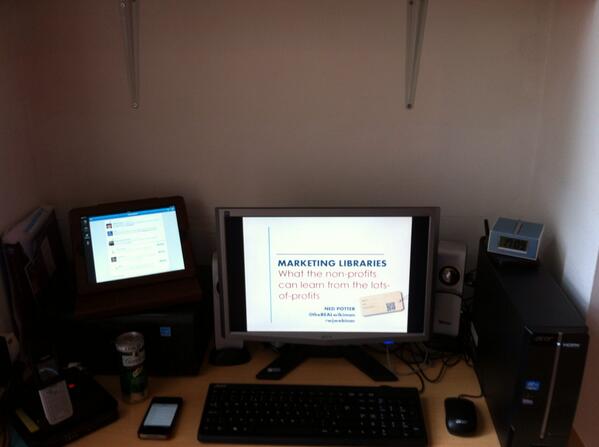
A picture of a desk with PC, iPad etc

Above is what my desk looked like - iPad to monitor tweetstream (which I didn't have the wherewithall to actually do), landline phone to speak into (I had it pressed against my ear for the first half hour before realising there was nothing to actually hear), G&T to drink (later decanted into a glass with ice, don't worry), iPhone to live-tweet pre-written draft tweets from (it was too stressful to do this well, so I sort of tweeted them in clumsy groups), PC to present from and clock to keep to time by.

I asked for some advice on Twitter about what makes a good webinar - much of it was about good presenting generally, but the web-specific stuff centered around making it as interactive as possible (the technology limited how much I could do this, but I tried...) and giving people time to catch up (I think I pretty much failed to do this). Very useful advice from Jennifer at Web Junction included not putting any animations on the slides because these don't render well in the webinar environment (if I wanted stuff to appear on a slide as I went along, I made two versions of the slide and moved between them). The particular platform we used meant I had to dial in with a phone - a PHONE! - and talk into that whilst manipulating the slides, that was very strange. I had a practice run the night before and I'm glad I did - in essence I found out I just cannot present sitting down, I need the energy that comes from pacing around, so I ended up using my slide-clicker so I could wonder about my house without having to be too close to the PC... The downside to this is I couldn't monitor the chat nearly as well as I wanted to, to respond to questions, because I often wasn't close enough to read the small text.

This was the first time I'd done one of these solo - previous webinar experience had been as part of a panel. As is often the case, as soon as I've done something properly and learned how it works, I want to do it again but much improved based on what I now know. So I'm hoping to work with WebJunction again next year (I find their site a really useful source of information and expert opinion). But the feedback from this one was great, some really nice comments in the chat and even a reference to my accent via private message...

I enjoyed this whole thing, and clearly live-streaming and web-based events are going to be more and more important. They're very convenient for attendees, less so for presenters (I had to banish my family upstairs for example!) but I did get to wear shorts for a presentation for the first time, and even drink Gin & Tonic during it, and that was ace.


10 top tips to take your organisation's Twitter account up a level

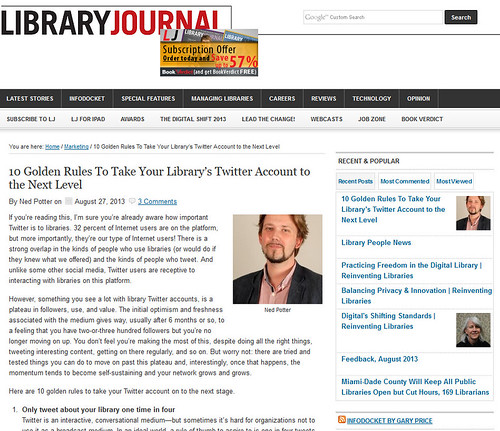
My current column for Library Journal is all about taking a Twitter account to the next level. It's hard to keep organisational accounts progressing - a lot of them plateau after a while - so there's 10 golden rules to get you past that point.  

Image of the LJ column online


The 10 golden rules in brief, are:

  1. Only tweet about your library one time in four
  2. Analyse your tweets
  3. Tweet multimedia
  4. Tweet more pictures
  5. If something is important, tweet it four times
  6. Use hashtags (but don’t go mad)
  7. Ask questions
  8. Get retweeted and your network will grow
  9. Put your Twitter handle EVERYWHERE
  10. Finally, avoid these pitfalls .

Read the full article with expanded information about each rule, here.

This Thursday (free) WebJunction Seminar on Marketing Libraries

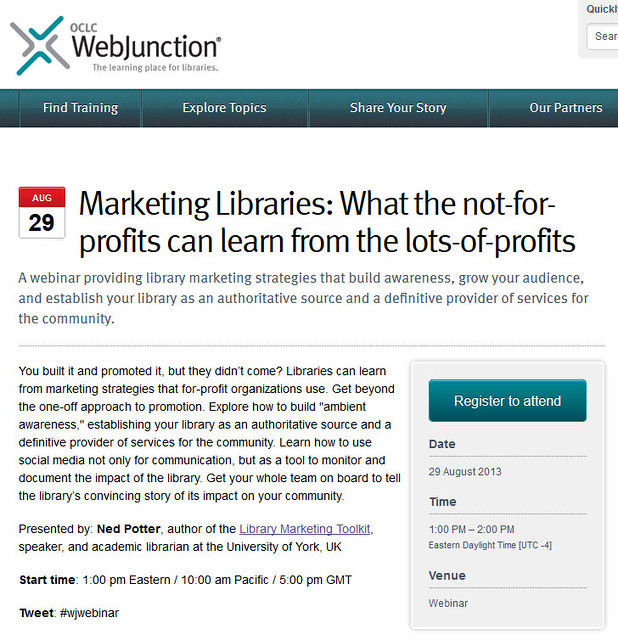
Just a quick heads-up that on the 29th of August, I'm running a webinar for WebJunction and my hope is it'll have a lot of useful information for anyone interested in marketing their library successfully. Details below - click the pic to go the website where you can sign up. Places are limited to 1500 and believe it or not we've already got 1300 people registered, so hurry!

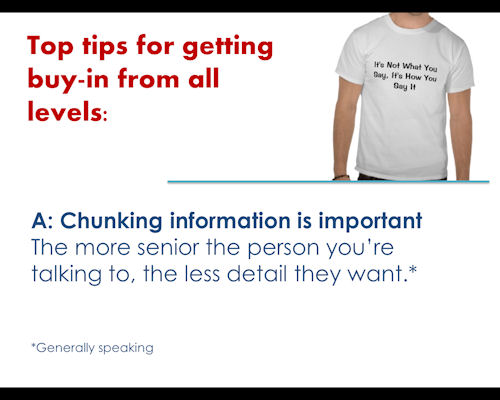
I'm really looking forward to this - I've been doing a LOT of stuff around marketing with new tech / social media recently, and even though that's my favourite area, it's nice to get back to some marketing basics with this webinar. It's about marketing principles and marketing actions - as always I try and keep it jargon free and low on waffle / high on things to actually DO when you leave. The focus here is on what the traditionally not-for-profit library can learn from the big businesses (there's plenty); I'll be referencing Apple, Honda, Hellman's Mayo (of course...). I'll also be covering word of mouth marketing, strategy, a bit of websites and social media, and bringing your team along with you in your marketing efforts - here's a sneak peak at a slide on that subject:

So if you think this sounds like it may be useful to you, go to the WebJunction site and click the button to register.

I've always found Web Junction materials really useful - particularly when writing my book - so I'm excited about doing something with them, particularly something that anyone with an internet connection can come along to. Hope to see some of you there.

How we made a (pretty nice) virtual Library Tour video for almost no money

NB: This post has been in my drafts folder since September 2012! I never got around to finishing it, but I've done so now because anybody who wants to use a similar approach, there's probably just still time to get your video ready for the new academic year if you start right away... Last year at York we launched our virtual tour of the Library - a new video to replace the physical tours we used to do. Here it is:

(This on my YouTube channel because I don't want to artificially inflate our Library YouTube Channel's viewing statistics by sharing that version on here.) I found doing this video one of the most stressful, tiring and rewarding things I've done in my job... This post is all about how we went about it.

Before we go any further, the first thing to say is the video went down extremely well with students and staff. We got great feedback on it, so I think this method works.

The principles

I watched every single virtual tour video I could find before planning this one, and this gave rise to quite a firm set of principles in mind as to how we'd do ours. There are some really goods tours out there, but every video I saw had at least one element I felt I wanted to avoid... So ours was based on the following:

  • No scripted scenes. This is a video aimed at students - they can be a cynical bunch, and I wanted to avoid any kind of construct or fakery that might annoy them. For example, the camera just 'happening' upon a reference-interview type situation at the desk, or wide shots of people walking to the next part of the tour - you know these are staged, and it influences the way you perceive the film. Our video would be delivered straight to camera, with people telling the viewer how things work, and showing them directly.
  • No librarians on camera. Librarians can be quite bad on camera but that has nothing to do with this principle - we just felt it would be better to have students telling their peers about the Library, rather than us. It's a stronger and more relevant connection.
  • Professionally shot, informally delivered. This was a really hard blend - it had to look professional but it needed to be as informal as possible. So the informality comes from the script, which I encouraged the students featuring in the film to change if need be, so it was more like their natural way of expressing themselves.
  • No big theme, attempts to be funny, or over production. We wanted to avoid anything that would date quickly, or fall flat, or leave us open to accusations we were spending too much money on videos and not enough on resources...
  • No barrier to watching the film. I saw some tours which were QuickTime vids or more sophisticated things than video, but often they needed to be downloaded, or didn't work on certain platforms, or were otherwise tricky to access in some way. This would be a YouTube video, pure and simple. It means we can embed it anywhere, and it's discoverable online.
  • Benefits not AND features. Normally I'd advocate talking about the benefits of something rather than the features - it's marketing rule 101. But in this case, we really do have to tell people about the features of the library because that's what a tour does - so I at least tried to add in some benefits too, hinting at the recent studies showing students who use the library most get the best grades, for example.
  • Short and to the point. I ideally wanted the video to be under 5 minutes - in fact it's around 6-and-a-half because there's a lot of library to cover and we didn't want to sacrifice usefulness for the sake of hitting a particular figure in terms of timings. But it is as short as we could possible make it. .

The people involved

We employed a Marketing Intern specifically to make videos for us (a genius idea by Michelle Blake!) - he was with us for 3 months, working 2 days a week (the maximum allowed). His name was Balam Herrera, he was a Production Postgraduate in the Theatre, Film and Television Department here at York, and he was absolutely brilliant. I managed him and the video project - as well as the Virtual Tour, we made around 15 short films too (more on that in a future post).

(By the way here's Balam's website: www.balamh.com - I can't recommend him highly enough, he was great to work with.)

We also employed students from the same TFTV department, to present. They had camera experience, and knew how to get a lot done in a short space of time - this was vital to the success of the project in my view.

The camera equipment we borrowed from the University's A/V department.

I no longer have the figures to hand (the perils of not finishing off a post for 10 months!) but basically it cost us under £300 to do, between the intern wages and the student presenters. (That excludes my time setting it all up, but we'd be paying for that anyway...)

The process

Putting together this video happened approximately like this. I wrote a script for what I wanted to be said, and sent it round various senior managers and marketing people for approval and changes. I asked the Chair of TFTV's Board of Studies to send round an ad recruiting for presenters on my behalf (more credible coming from him than from the Library). I watched a lot of YouTube videos as a method of auditioning those that applied without taking lots of time out to meet them all, and chose the three presenters you see in the film above. We set a date. I gave Balam the script. He turned it into a proper shooting script - I'll embed it below, and when you see it you'll realise how important it is to have someone who knows what they're doing with film-making! Then Balam did as much of the filming as he could beforehand - all establishing shots, external time-lapse stuff - anything without the students in, essentially.

Then we filmed it, and edited it, and promoted it A LOT.

Filming it

We filmed it in a day. Even though we did it all between 9 - 5 it felt like the longest day of my life! I was completely wiped out by it - but it was fun too. Here's our shooting script - hopefully gives you an idea of the level of planning that went into this:

Library Tour Shooting Script

If you watch the video and compare you can see how things evolved on the day - we didn't stick completely strictly to the plan.

Generally speaking we got things within a few takes - there were no long sections so the students were able to briefly check their scripts before each shot, then deliver their lines. A lot of time was spent re-shooting the same scene from closer in (we only had one camera), or waiting around for people to stop doing noisy refurbishments which were going on in the Library at that time. In the end we got one student back to reshoot a scene a month later because our catalogue changed - 10 points if you can spot the scene in which he's wearing a different top because the one he wore the first time was in his parent's linen basket back home!

Editing it

Editing it took a LOT longer than filming it - Balam did that on his own, and at great speed, but it still took several days. We had, in total, 120 gig's worth of footage! I tried so hard not to be one of those incredibly annoying managers who makes people change tiny things at great length so it was perfect, but I'm afraid that's pretty much exactly what I was like. We had about 4 drafts in the end, but I was completely delighted with the results.

I wrote the music as a temporary measure until we licensed something proper, but then we ran out of time so had to use mine! We also meant to do a separate version with text on the screen, but ran out of time for that too - all of our other videos have text on the screen so they can be watched without the need for sound, but this one just has a link to a transcript, which isn't ideal.

Promoting it

Although a video is in itself a piece of marketing, it still needs to be marketed. So we tweeted about it (and by the way, tweeting a link to something once does not constitute marketing - if it's important, you need to tweet about it at least four times at different time of the day to catch different audiences) a huge amount, we blogged about it, we embedded it on all of our subject-specific libguides, we embedded it on our 'welcome to new students' pages, we played it in Induction sessions, and we emailed key people within departments to ask them to promote it. It's had, at the time of writing, over three-and-a-half thousand views - the stats tell us in real terms it's had 10,700 minutes worth of viewings. It's hard to imagine any other way of getting that much targeted library information into our students! Around 60% of people watch it on YouTube itself, 30% on embedded version in various places around our website, 8% on mobile devices, which is lower than I'd've expected.

If you want to try something similar…

First of all, start soon - now if at all possible! Tap into the local talent - if your HEI has a film studies department, then you have a pool of talented and willing people to help you do this. Prioritise the key videos you want to do and shoot them first. If you can't afford expensive software, Camtasia is really good for live-action stuff as well as screen-capture. Oh and this guide to marketing with video may be useful.

It's really, really important to promote the heck out of your tour. It's so much effort, you can't risk not getting any reward! Promoting it does not mean putting it in the VLE and mentioning it in the news section of the Library website - it means raising awareness as to the video's value via several media at once.

Good luck!

Any questions, leave them below.