In September I made a new video to introduce the Library in 60 seconds. It was designed to be played in short Induction talks, and to be embedded in various online guides. The whole thing took around 4 hours to do (albeit spread across a couple of days) and it turned out pretty well - before we go through the step-by-step process here's the video:
It was made using Videoscribe, and they just published their 'Favorite VideoScribe videos of 2019' which, it turns out not only has videos from the BBC but also from our Library! The video above being featured on their list has reminded me to complete this blog post, which has been in the Lib-Innovation drafts folder for a while...
Step 1: Script-writing
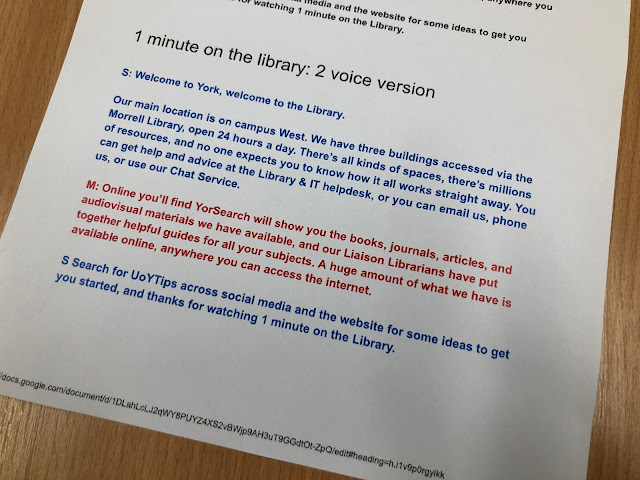
Because we were also producing a longer virtual tour, I knew from the start this would be only one minute long. This was surprisingly non-limiting in the end: once you accept you can't go into detail on anything, it becomes quite easy to write a friendly voice-over that introduces a number of key points in quick succession. The purpose of the video was to provide an overview, help students understand the basics, and encourage them to ask for help. So a brief script was worked up with that in mind, and I shared it with a colleague for a second opinion, then with the narrators.
I wanted Yorkshire voices for this introduction to a Yorkshire library, and I wanted people who were friendly and informal, and I wanted it to be a man and a women ideally. Happily my first choice voice-over artists (Sarah Peace from IT and Martin Philip from Academic Liaison) said yes when I asked them to do it!
Step 2: Voice-over recording
The hardest thing about recording narration is finding a suitable acoustic in which to record. Even small meeting rooms in our building seem to be echoey, and although the Linguistics Department does have an audio booth we can get access to, it wasn't available in our time frame. In the end we chose quite a big room that has enough in it to absorb any resonance, leaving us with an acceptable sound quality.
I recorded my narrators on my own laptop using Audacity, a freely available audio-editing tool, and an entry-level Blue Snowball mic I use for webinars. It took 40 minutes to record both this script and the Virtual Tour script, and the main issue was making sure the narrators were close enough to the mic.
Audacity is incredibly simple to use. You can zoom right in on the visual representation of the audio-waves and easily identify what talking and what is not - for example, in-breaths before a word. Breaths and pauses can be selected, highlighted, and deleted. For this reason, there was absolutely no need to aim for a perfect take of the narration. Each narrator took their time delivering their section, re-running any sentence they weren't happy with. It then took me perhaps 20 minutes to edit the audio into one seamless narration, and export it as an MP3 file to add to the video.
The audio for the voice-over, as displayed by Audacity
Step 3: Creating the video with Videoscribe
The process of creating a video with this software is to add objects to the canvas (a little bit like you might with Prezi) and then decide how they are animated, and when. So for example you can just type text in and have a hand or pen 'write' the text at the speed of your choosing, or you can add photographs which can either be 'drawn' or pushed into frame by a hand, or just appear. You put all this together, add music and a voice over you if you wish, and you have a video.
I've tended to always build towards a final picture that includes everything the viewer has just seen - so you see each section as it's added, and then at the end you zoom out to see everything at once. But you don't have to use this approach - you can stay buried in the detail if that helps you tell your story.
The VideoScribe interface looks like this:
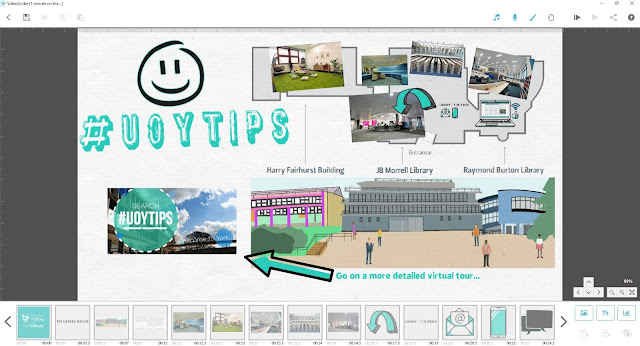
The main part of the screen displays everything that will appear in the video, but the boxes along the bottom are how you dictate when objects arrive, how they enter the video, and in which order.
Here's a closer shot of that:
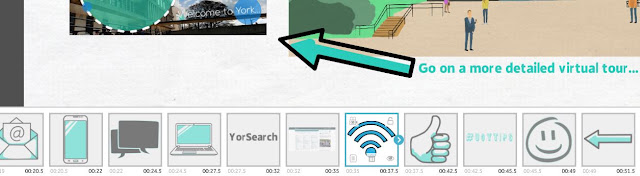
All those icons - the phone, the thumbs up, the wifi symbol etc - are from VideoScribe itself. There's also some writing, and (in the middle) a screengrab of the library catalogue.
Absolutely key to a good VideoScribe video, in my experience, is the 'Set Camera to Current Position' button I've highlighted here:
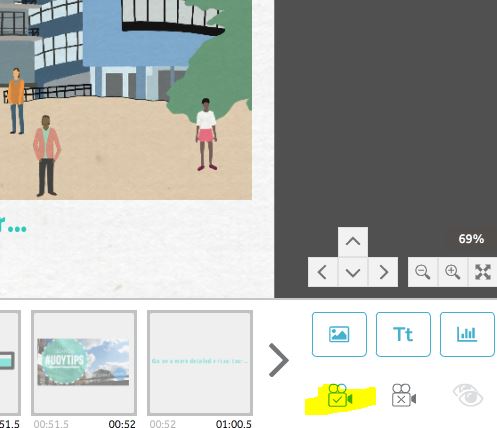
This allows you to control what the camera sees, meaning you can have multiple objects in the frame at once. For example at the end of the video there's a big smiley face and the #UoYTips text added: by default the camera would zoom in so these filled the frame, meaning you could only really see them. But by setting the camera to the same position for the last three sections of the video, you get to see the entire library map, AND the smiley face / #UoYTips in the same shot.
The whole process of creating the video took around 2 hours: trust me, this is REALLY quick for making video content!
Step 4: Exporting to YouTube
I exported two versions of the video: one directly to YouTube, and one as an MP4 file to embed directly into the Induction PowerPoint presentation me and my colleagues would be using throughout the first week of term.
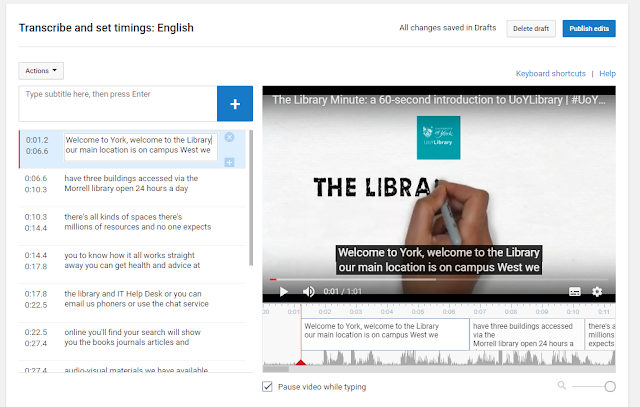
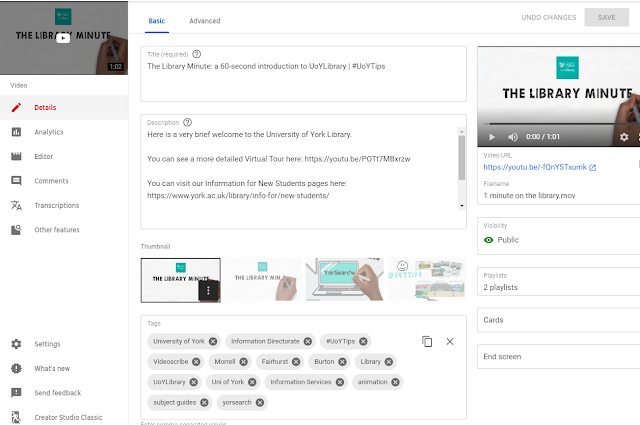
With the YouTube version there was probably around half an hour of faffing involved - writing the description, title, all the keywords, and so on, and editing the subtitles. YouTube's auto-generated subtitles are actually pretty good, but they contain no punctuation or capitalisation and sometimes get names or other words wrong - in screenshot below you can see it says 'you can get health and advice' which I had to edit to 'help and advice':
It's a relatively quick job and of course well worth doing to make sure your video is accessible.
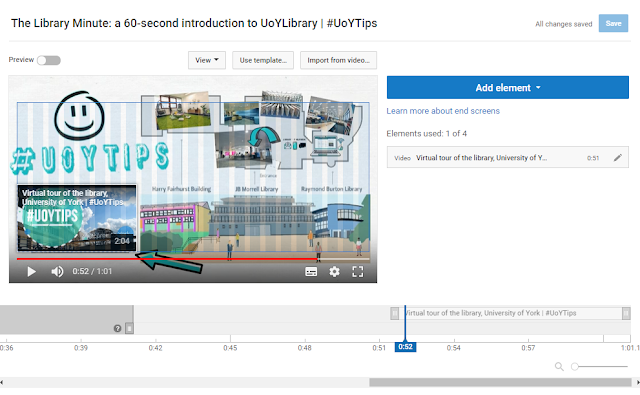
If you've watched the video above you'll have seen that the narration ends at least 10 seconds before the end - this is because I wanted space to link to another video (the more detailed virtual tour), a clickable thumbnail of which appears in the bottom left of the screen. This was achieved by inserting in YouTube itself, via the End Screens menu. As you can see below, the video itself is designed to receive the thumbnail in that exact position, with the arrow pointing to it.
One final piece of admin was to create a custom Thumbnail for the Library Minute video itself. YouTube auto-generates three for you - normally none of them quite work as an encapsulation of the video, so you have to make your own (either from scratch or, more often in my case, just by taking a screenshot of the video at the best possible moment).
Step 5: Promotion
Even though the video is a piece of marketing, it still needed to be marketed... I saved a version for adding to Induction slides, and then created a slide in which it was embedded for everyone to add to their presentations.
We also tweeted it, put it on Instagram (where it did much less well than I expected, interestingly) and embedded it on key web pages such as our Info For New Students page.
And that's it! Videoscribe is a tool which we pay for on an annual basis - we don't often do this with so many great free tools available, but we feel it's worth it in this case. If you have any questions about the software or the video above, let us know in a comment...
The old ‘customer’ debate reared it’s head again recently, with an article in Library Journal asking why academic librarians have such a problem with the word.
I tweeted about it, rather flippantly:
Glad you asked, Steve!
There are many reasons but foremost among them is, we don’t want our users to see *themselves* as customers.
A customer only needs the library to work for *them* but a community of users wants it work for all.
… but then I decided what I should have done is write an actual rebuttal, a little less facetiously phrased, in Library Journal itself. Then maybe some of the people swayed by Steven Bell’s pro-customer stance might be re-swayed by my arguments against it.
I recently used all these arguments to change something at my place of work. I have a new part to my role, to co-lead the Customer Engagement programme at the Library and I argued, with some support from a couple of colleagues, that this programme should in fact be called Community Engagement instead. To my delight this worked and I am now the co-lead for the Community Engagement Programme. I was grateful that the relevant people were flexible enough to listen and make the change, and it reminded me that making even relatively small headway on important issues is always worth trying to do.
Anyway, I used to write a column for LJ so I looked up their staff list to see whether anyone I dealt with back then was still there, and one person was, so I pitched the article and got asked to write 800 words - which I did and which, I just remembered two months later, Library Journal have not published. I sent a chaser a while back and a reply was promised but I’ve not heard anything either way…
But still want it out there in the world. I believe very strongly in the arguments against using the word ‘customer’ so: here is what I wrote.
I’ve been in librarianship for 13 years now and there’s never not been a time when we’ve been debating how to refer to the people who user our libraries. I hate getting bogged down in semantics, when there are so many more urgent problems to address than sobriquets. But this particular hill is worth dying on, because language matters so much. It shapes not just the way we see people, but the way they see themselves.
In his July column Steven Bell asks us why academic librarians have such a problem with referring to its faculty and students as ‘customers’. I don’t buy his arguments that this stems from some sort of elitism, but I certainly used to share the view that customer is the right word to use. It was forward-thinking, I thought. It reflected our commitment to customer service, I thought. I was struck by Helene Blowers’ argument, 11 years ago now, that patrons support institutions whereas institutions support customers, which is the way round it should be in libraries. And I thought the warnings from the anti-customer brigade, that this was the thin end of the wedge of the monetisation of HE, were over the top.
Well, I was wrong.
There are more reasons not to call our users ‘customers’ than can I can fit into 800 words so let me start with what I think is the most important one. When we call people customers, they see themselves as customers – and if I’m your library’s customer I need your library to work for me. For me specifically. I want you to meet all of my requirements even if this creates inequalities with my peers because I, the customer, am right.
This is instantly at odds with the ethos we try and create in academic libraries, which is one of community. While a customer needs the library to work for them, an academic community of library users needs it to work for everyone. Indeed, they need to actively contribute to that process of successfully sharing community space, using community resources, and working towards community ideals. That alone is a good enough reason not to call our users customers.
Then there’s the fact that they don’t like it. Our students and faculty don’t want to be reduced to a transaction to be completed, and it’s important to note we can nevertheless be extremely attentive to their needs and offer an extremely high level of service. The ‘strong, customer-focused service model’ Steven calls for is still possible without actually casting our users as customers with the consumerist mind-set this implies.
The language we use helps frame Higher Education, and it is increasingly economic. The Vice-Chancellor of Cambridge University, no less, referred to this recently, saying: “Reducing students to mere consumers makes sense only if the value of universities is simply economic. That would be a fundamental error.” University is about so much more than the degree you get at the end of it, and yet with the marketization of HE more and more students see themselves as buying a product: it becomes all about the outcome at the expense of the experience. If we are to resist being swamped by consumerist ideology in our Universities, if we are to do our best to stop information becoming completely commodified (and much brighter minds than mine have written about this), then the language we use needs to be chosen carefully.
The obvious question at this point, then, is: so what DO we call the people using our libraries, then? Patrons, Members and Users all have their flaws as terms – personally I favour the latter, but it’s not ideal. The trouble is, there is no ideal term; I’ve heard ‘there’s no perfect word so why not just choose customer’ advanced as an argument, and I strongly disagree with this. Just because we can’t find the ideal solution, doesn’t mean we should sleep-walk towards the worst one. Recent political events in the US and the UK should have taught us that if nothing else.
The word ‘customer’ in higher education is insidious. The users themselves don’t like it. It helps frame education as a purely transactional experience. And it celebrates the cult of the individual: “Prioritising people’s individual demands risks intensifying inequalities in access to services, and in generating collectively undesirable outcomes,” as Catherine Needham puts it.
So please can we ditch ‘customer’? The real C-word should Community; let’s focus on that.
I have an uneasy relationship with the concept of ‘brand’ in the library context. On the one hand, I think it’s often misunderstood. I think it’s the kind of thing on which marketing consultants from outside the industry put far too much emphasis - on the list of things to fix about library marketing, I bet our users wouldn’t put ‘brand’ that high up… On the other hand, in the academic sector that I work in, most traditional marketing goals are already being fulfilled fairly successfully: academic libraries are often full, well-used, and well-regarded. So that allows us some time to consider some bigger questions - for example, what is our brand and what would we LIKE it to be?
Before we go any further let’s sort the definitions: ‘brand’ is not colours or logos or slogans.
Your brand is the perception of your library, your services and your collections in people’s minds. It’s how people think and feel about who you are as an organisation, and what you do.
Branding, on the other hand, is the process of trying to influence people’s perceptions of the organisation, and the way they regard your brand.
At my place of work I’ve been thinking about this a lot recently, as I’m attempting to sketch out some marketing principles for my library. Before I can create a strategy for what we want to say and how we want to say it, we first have to understand what we want to BE and whether that involves changing from how we are now, or not. It’s easy to get side-tracked into an existential crisis.
I also want to know how both students and staff at the institution view the Library. We know how they rate certain services, and our UX work tells us a lot about how they use our facilities. But as to how they would describe the library, how they perceive us, what they would say our brand is - I don’t know, and I’ll like to ask, but I’m not sure exactly how to go about it. (Any ideas for this gratefully received.)
Slides from #dffu2018 on Branding the Academic Library
I was honoured to give a keynote on this theme in Billund, Denmark, towards the end of last year. We discussed what brand was, what community was, and marketing strategy. The slides from the talk are below:
Thank you again to the Danish Research and Academic Libraries group for inviting me to speak, and to Christian Lauresen for his insight into Danish libaries, as well as to Jan Holmquist for his translation skills!
The title of this blog post is the opposite of click-bait: it says everything. It's the tl;dr not just of this post, but of successful library marketing per se.
One-off marketing almost never works, because people seldom act on a piece of marketing the first time they see it. When you see an ad, even a good one, you don't rush out and buy / do the thing right away. If you have Netflix for example, think about when you got it. Was it the first time you saw an ad? Or did you become more and more aware over time, and then eventually circumstances were right and you signed up?
In Library marketing terms we have to try and achieve the same thing. Build awareness over time of relevant services. Appeal to people at the right time. If we just push out lots of different messages all the time, this is too much information and its too dispersed - there's nothing for anyone to hold on to, and think 'this is for ME'. So 9 times out of 10 (at least) the successful marketing, the things which have impact and make a tangible difference to the Library, are in the form of campaigns. What does this mean in practice?
Campaign marketing consists of delivering the same message, tailored across different platforms, for a sustained period of time.
So your users see the message once, and they register it. They see it again somewhere else and they decide to act on it. And then perhaps a week later they see it again and that's when they change their behaviour, and do something they weren't going to do before. You need a week or two of focus on the same message to make that change happen.
Examples of great campaign marketing
I was at the PPRG Marketing Awards Conference last month, and the one thing which united virtually all the award winners was campaign marketing. You can see all the presentations on the PPRG website but here's some key examples.
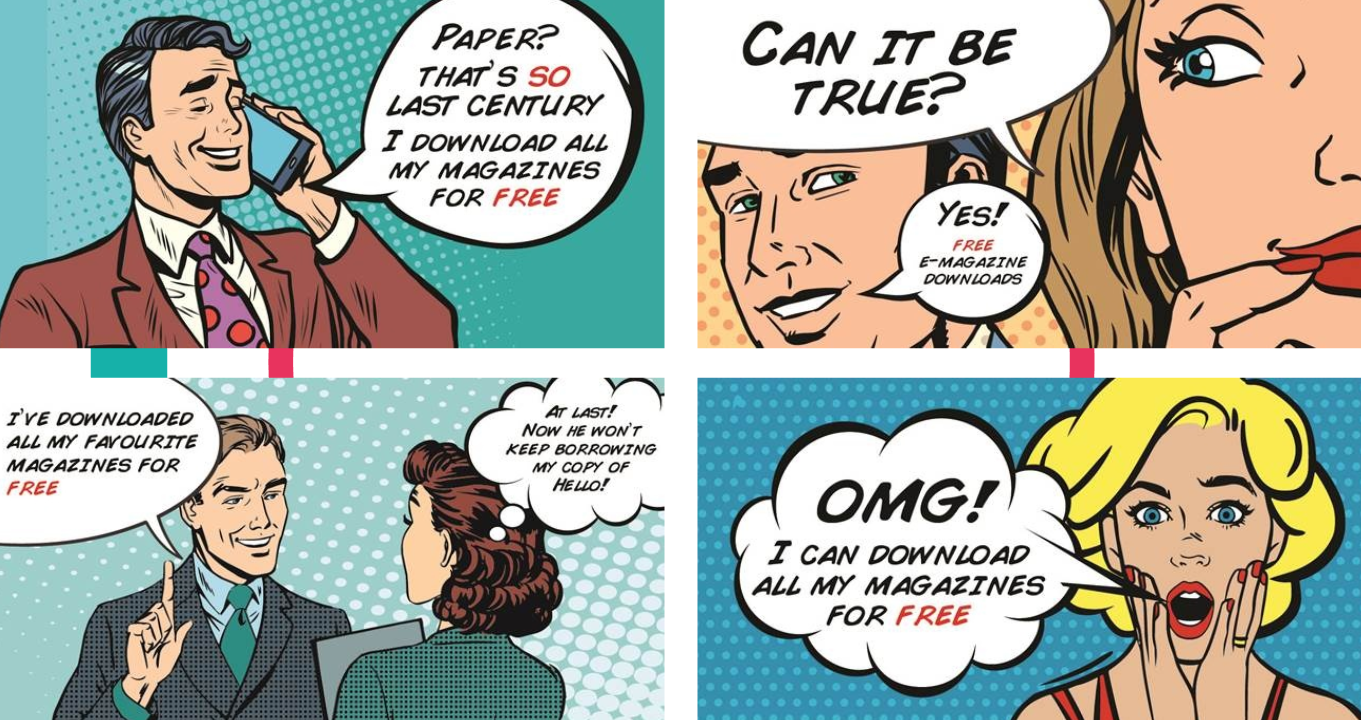
Hampshire Library Services. Hampshire undertook a really comprehensive campaign to promote the free digital magazines service they had, which wasn't being used enough. You can view their Prezi here - it's well worth a look. Here's an example of their campaign visuals:
Hampshire Library Services campaign visuals, taken from their Prezi linked above
The key thing about these four ads is the visual style is so striking, you'd easily associate one with the other if you saw them seperately. So again, perhaps the first time you see the ad you think 'oh that's great, free magazines at the library!' but that still isn't enough for you to ACT. Then you see the second one and it reminds you of the first one, you associate the two, and it's the second push you need to go and actually download an e-magazine.
And downloading e-magazines is exactly what people did based on this campaign. Here's a key stat:
That's the thing about campign marketing: it really, really works.
Another great example was from Islington Library and Heritage Services. Take a look at the #islington50s slides here. They had a one-month campaign, with a set number of social media outputs each day, a clearly defined set of objectives, and both a library-user and non-library-user audience in mind.
Here's the slide on the impact it had:
Click the pic to open the entire presentation in a new window
I love the details that their Local History Centre was rushed of its feet as the impact of the campaign spread through the community!
The final example is local to me - York won a bronze award for our UoYTips marketing campaign. We ran our academic induction as a marketing campaign in 2016, and it worked so well we've built upon it for 2017. There are all sorts of reasons why we did this and why it worked - but again the key thing is, it was a campaign. Key messages over a concerted period of time. Here's a video I made that has the audio from my talk, plus a more video-friendly version of the slides:
If you want to run a campaign, here are some things to think about.
Your campaign needs to be the primary focus of your comms for a concerted period of time. It doesn't mean you don't talk about anything else, just that you keep talking about the subject of the campaign
The same message needs to go out across multiple platforms, but it may work better when tailored for each - you wouldn't neccessarily use the same phrases, words or images for twitter, an email, a poster on the Digital Screens, and Facebook
A strong call to action is important. It's not enough just to pique people's interest - they need to know how to easily take the next step to engage with your campaign (visit a website, come to an event, fill in a form, whatever it might be)
Don't just measure outputs (tweets, posters etc) but outcomes - what happens as a result of your campaign? This takes time but it's worth it because you can build on what works
The title of this post is something I often ask delegates in marketing workshops. It's rhetorical, usually - I'm trying to get people to think about how seldom marketing makes them change their behaviour. Think about how hard it is for marketing to get YOU to do something you weren't already going to do, and you see the scale of the challenge we face when marketing libraries.
That's why putting up a poster and sending a tweet doesn't constitute having 'marketed' something. If seeing a nice poster and a tweet about how good something is would not be enough to get you to take a (new) action, then chances are you users won't act either.
For this post though I'm keen on exploring this issue non-rhetorically. I want to hear your answers. I've set up a google form because I figure people may be more comfortable doing this anonymously. I'm interested in what makes you act on a piece of marketing. If you did something you weren't going to do because of an ad or a campaign or anything else, what did you do and why did you do it? From the results I hope to learn things we can apply to library marketing.
Here's the form. I'm aware it's really inelegantly phrased, there's probably a much more succint way of putting all this... (If you'd like to share the question with anyone, the link is https://goo.gl/forms/IxalsAl2swfME5v52)
Thanks in advance to those who fill this in, I appreciate it. I'll come back and anaylse the results in a future post.