
Marketing

Blogging: the three main options and platforms for hosting a blog

The issue of where to host a blog is fairly complicated for people new to the medium - particularly the differences between wordpress.org and wordpress.com. I often have to write a condensed version of the advice below in emails to people as follow-ups to blogging workshops, so I thought I'd put it all in one blog post in case others find it useful too.

Why does the platform matter?

Every blogging option comes with its own advantages and drawbacks. On a basic level they run on a sliding scale from quick, logistically easy, and ugly / annoying to use at one end, to more complicated, faffy, and nice to look at / simple to use at the other. Often the more basic solution starts off okay and then becomes problematic later on, but you can migrate blogs to new platforms without too much fuss, so if you set up a wordpress.com blog on a whim and it turned into something significant and valuable, so now you want to upgrade to wordpress.org to get rid the weight-loss ads which have started appearing on your posts, then fear not, you can do exactly that.

All blogging platforms have some things in common. They all have a basic word processor interface for typing in posts, they all give you stats on how many people are reading your posts, they all give you ready-made options to help readers subscribe to, search, and share what you're blogging. All allow you to pay for a URL and so call your site the slightly more credible-looking yourname.com rather than yourname.wordpress.com or similar.

You could show all of them to someone in the year 2000 and their jaw would drop open at the sheer POWER and SIMPLICITY of what you can do in 2014 FOR FREE and with no knowledge of code / building websites. They're ace. They're an opportunity.

I have not included Typepad in this list because it's a paid for service - it's very good but, having tried it out, I don't believe it represents the kind of step up from the free options below which would warrant a monthly cash investment.

Blogger

Blogger.com is a Google product. It is sometimes frustrating and pernickety to use, and is the least aesthetically pleasing option. It looks dated, both to the author and the reader. However, it is free - and at the time of writing, you get no adverts on your blog posts unless you choose to put them there yourself.

Setting up a Blogger account is the most straightforward - if you have a Google account, you effectively have a Blogger account whether you've made use of it or not. Just go to blogger.com, log-in, and click create blog (further instructions here). I use Blogger to power my Library Marketing Toolkit website - I chose it because it is free, doesn't require the logistical hassle of self-hosting, and won't display unwanted ads. It took ages of tinkering to make the site look relatively nice though, and it still looks pretty 90s.

Blogger is quickish, powerful and a relatively straightforward way to build a website - you don't HAVE to use it as a blog, even. 10 years ago this would be the greatest most useful thing ever - it's only because there are easier and more attractive options now that we don't now celebrate its glory.

I recommend Blogger to people who are dipping their toe into blogging but aren't yet sure it'll be a major part of their professional lives, and who need the credibility that comes with not having ads. If you don't mind the potential ads on your posts, then option two, wordpress.com, is a better bet.

Wordpress.com

Wordpress.com is, like Blogger, free and easy to use. Wordpress hosts the blog for you, so there's no need to self-host the website. Compared to Blogger, it is basically easier to use, less frustrating, more flexible, more fresh and modern and nice looking, and great.

The only major downside is that after a certain popularity threshold (I'm afraid I've not been able to pin down exactly where this threshold is) you get ads on your posts, which you can't control or turn off. As I say, if this isn't a problem for you, go for this option, it's great. A second more minor downside compared to Blogger: at the moment you can't use Google analytics with it, and there are occasional issues around embedding dynamic content.

I used wordpress.com to power the Buy India a Library site - it was ridiculously simple to create that, literally in less than an hour, and without needing any knowledge of HTML etc. I also used it for my band's website, below - again, this took a tiny amount of time considering it looks nice and works well.

Wordpress.org

In many ways wordpress.org is the gold standard option - it affords the most flexibility and the most control. You can set your site up any way you like using a greater number of free themes, or by paying for a 'premium' theme, or by designing your own - this thewikiman site is a wordpress.org blog, with a theme I created, writing the HTML.

Two other things there are much more of with wordpress.org than with .com or Blogger are analytics - you can get hugely detailed statistics about who is visiting your site, for how long, when they're from, what makes them leave and so on- and plugins, which is to say the little widgets which appear in the column down the right-hand side. Whether it's Twitter and Facebook sharing buttons, or embedding a Twitter feed or YouTube account, or being able to print these posts to PDF, or displaying the most commented upon posts - all of these are plugins which I didn't create myself, but which already existed and I just applied them to this blog. And you never get ads, or indeed anything, placed on your blog, which you don't put there yourself.

There is only one downside: HASSLE. It is a hassle to use wordpress.org because it is 'self-hosted'. So while Blogger and Wordpress.com blogs sit on the blogger.com and wordpress.com sites without you having to do anything, you need a host server for a wordpress.org blog, onto which you have to install wordpress software. It is possible to find free hosting, but it will put so many limitations on its not worth having - so that means paying for hosting, and paying for the domain name. In my case it's £96 per year for the hosting, and £20 for the domain name. I used to have a cheaper hosting package, but I used up all the bandwidth before the end of each month (due to the amount of people visiting this site) so had to upgrade - although now I hardly blog anymore, I should probably look at going back to a cheaper package.

Wordpress recommends these hosting companies, but personally I recommend Clook very highly indeed. Great service, good prices, wordpress.org can be installed automatically without any technical know-how, and the tech support is completely fabulous. I once tweeted in passing about how my blog was down due to server maintenance, and Clook saw the tweet, looked into it, saw there was a problem with my blog specifically, fixed it, and THEN tweeted me back to say it was sorted! All without asking me any questions or telling me to stand by while they investigated; I hadn't even logged a request with technical support online or actually solicited their assistance. They're ace.

The other hassle is maintenance. Wordpress.com blogs get everything taken care of by Wordpress - the .org version you have to upkeep yourself, installing updates (which is a simple, automatic process) of both the software itself and your plugins.

In my view all of this is worth it for this, my main site - but not for any other projects I'm involved with thus far. If you don't mind the fact that you have to be more proactive in set-up and maintenance, and can afford hosting, it's the best option by far, in my view.

(Bonus option: Tumblr)

Tumblr began as a short-form blogging platform, somewhere between a traditional blog and the instant communication of Twitter. People can use it however they want, but personally I think you need to be on Tumblr for a reason - it's not a direct equivalent to the options listed above, but something a little different. (The BL's mechanical curator is my favourite reason for a tumblr so far...)

Tumblr is a self-contained community in the way the others are not. There is a ready-made group of people for you to join in with, and by far the fastest growing group of users - because it massively popular with a younger demographic, Tumblr continues to grow incredibly rapidly. But you need a Tumblr account to comment on a Tumblr post, so it's not the ideal medium for reaching and interacting with as wide a group of people as possible. By all means set up a Tumblr if you have something offbeat which suits the 'brief and often' nature of the medium, but if you're setting up, for example, an academic blog, I would recommend choosing wordpress or blogger.

So! There you go. I hope someone finds this helpful. Any questions, leave me a comment.

Good luck.

Libraries, Beacons, and the Internet of Things

A while ago I tweeted this helpful graphic:

I know what you're thinking - it will be climate change that renders the debate on the future of libraries moot, not the singularity! And you're quite right, of course.

The Internet of Things will, hopefully, be a big deal in libraries. Some of the technology associated with it feels very far-away in terms of the resources it would take to implement it, but we've seen how these things work - what starts off as unattainable fantasy becomes cheaply available reality soon enough.

But what does it mean, though? I mean really mean, for libraries? I found this UX article on beacons very helpful in giving me an overview of the technology, and this post is an extrapolation of the ideas it presents, into a library context.

What is The Internet of Things?

In short, the Internet of Things refers to when objects are able to connect with each other online, because they can be uniquely identified.

We're actually very familiar with this in Libraries, because we use RFID. You put the book in the cradle, and that book (due to its RFID tag) speaks to the issue-machine, which then informs the library management system that the book has been issued to your account. It's the internet, but interacting with a Thing! Brilliant.

What are beacons?

Beacons are wireless devices which use Bluetooth (but an especially low-energy version which doesn't drain battery) to broadcast to other Bluetooth objects around them. You may have seen wearable technology like Jawbone or Fitbit, which monitor your physical activity - these use beacons to 'talk' to your phone, allowing you to get information via your phone's screen.

In physical terms, you can already get commercially available beacons - for example from Estimote - which are discreet physical objects (as opposed to something integrated into a Fitbit wrist-band) to put in physical locations, allowing smartphones to interact with them according to parameters you define.

Give me some examples of what Libraries could do

Here are some ideas to enhance the library user experience:

  1. Locate items from my books list. Most library catalogues have a 'favourite' function, where you can add items to a list. Imagine you make your list of books at home using this feature, then come into a library fully hooked up to the Internet of Things - as you walk in, you're presented with a map and directions to each of the available items. You'd know before you got past the foyer if any books had already been borrowed, and you'd even be able to find them if they were misshelved. .. Wait, come back! I've got better ones, look... .
  2. A self-guided virtual tour. Set up beacons at key points around the Library, and send users off on a tour. When they get to each location their phone plays them videos, or audio, and gives them more information on how to get the most from that area. Combine this with augmented reality to really knock people's socks off. .
  3. An enriched Special Collections experience. When you're near the glass case displaying the rare and precious illuminated manuscript that you can't touch, your phone or tablet can show you the whole document in digital format. It could even play you audio of expert analysis by the Special Collections librarian. .
  4. Contactless fine payment. The Internet of Things knows how much you owe, and has the capability to let you pay it without you having to queue for a till or a card-reader. .
  5. Availability of machines. Some library apps already show you which PCs are in use and which are actually free within the Library building, which users find invaluable. Beacons could easily extend this to printers (and 3D printers), scanners, study rooms, blu-ray players etc etc - all quick to check from your phone as you enter the Library. .
  6. More details on items. In the same way you can put a QR Code on a DVD box which takes the user to the imdb entry on the film in question, or on a music score to take the user to an MP3 of the piece, you could give any manner of contextual information on items in your collection via the Internet of Things. If a user is in the vicinity of an item, she or he will be able to get information on it online via their phone. .

My brain is not particularly wired to invention. When someone else lays out ideas I can spark off them, but I can very rarely think up anything from scratch - so with that in mind, the list above is quite small, and I'd be VERY interested to hear what you think we could do with this technology, via a comment...

Building your professional reputation. Library adventures in Cape Town part 1

In October I was invited to South Africa to speak at LIASA 2013, the 15th annual Library and Information Association of South Africa conference. It was in the fabulous City of Cape Town and it was incredible; I just haven't had a chance to put my thoughts down in a blogpost until now. But I know not everyone is particularly interested in a 'here's what I did' type post so I've put that separately in Part 2. There's also a Part 3 to follow about the differences between UK conferences and international ones. I was asked to do three things at the conference - a marketing workshop (half a day on strategic marketing and half a day on emerging technologies), a session for the Higher Education Library Interest Group on induction / orientation here at the University of York Library (the presentation is here, although it doesn't make much sense without me talking over the top, I'm afraid), and a talk aimed primarily at new professionals on building your reputation and professional brand. It's a tiresomely controversial subject, this; what it comes down to for me is that people fairly new to the profession can sometimes worry about being some sort of super librarian and DOING ALL THE THINGS, but actually you don't have to be like this at all. You just have to get involved with the areas of librarianship which correspond to your goals in the profession. So the talk was about that, and about different ways to be part of the wider community.

Below is the talk: it consists of my slides, the audio of the talk (recorded from my iphone in my jacket pocket!) and a couple of pictures to look at while I talk about some things I wasn't intending to talk about, at the very start.

It was fun doing this talk, it was different to the normal things I do. The room was bigger - this is the first time, outside of the webinar environment, that I'd talked to several hundred people at once. Speaking to a room that size is very different to speaking to 30 people - my usual very conversational presentation style wouldn't have worked. Presenting is a bit like drawing a picture in that the further away the audience, the broader the strokes needed for the picture; the detail gets lost.

The atmosphere was different in SA that from conferences I've presented at in the UK, too - people were laid back, ready to laugh. I was one of only three international speakers so everyone was very welcoming. And also, this talk is a version of something I'd originally delivered at a New Professionals Day back in 2012 which was designed primarily to address an anxiety about branding I'd heard many new professionals express - an anxiety which, having arrived in South Africa and been at the conference for a couple of days already, I'd found to be largely absent! So I felt a bit like my talk didn't match my slides - certainly I was trying to manipulate the slides to tell a slightly different, more widely applicable story, as I went along. But anyway I really enjoyed it and I've had some genuinely touching feedback about people feeling inspired.

Parts 2 and 3 to follow!


The key to good marketing is to promote one thing at a time

If you've got a great idea, don't dilute it. Simplicity results in better traction for your idea. You need to give people one idea at a time, so they can grab onto it, digest it, and see how it relates to them. Not only that, but the simpler the idea, the more likely it is for people to share and pass it on. Think about the really successful online writers, like Seth Godin. He's made a career out of taking single concepts, focusing on them one at a time, and getting a bajillion hits to his blog as a result. Once people buy into his one-key-thing-at-a-time approach to ideas, they're then more likely to buy into him as a concept, and push his (more complex) books up the best-seller charts.

So, keeping things simple isn't dumbing down. It's providing people with an easy way-in. That's just good marketing. Much of marketing is to simply get people in the door - THEN you can give them a whole variety of reasons to say inside.

Most of the readers of this blog work in the information profession, like I do. This means we have a complex sell. Library services are myriad, but your promotion must be in bite-sized chunks. Libraries are complicated, but your marketing must not be. The secret to good communication is to market one thing at a time.

Here's an example of a poster promoting a library. In theory, it ought to be good. It looks okay, uses a nice font. But more importantly, it tells you about all sorts of amazing library services! What's not to like? How you can resist this?

But actually, this poster doesn't work. There's too much going on, it does not provide an easy way in. You're relying on people grabbing on to the part that relates to them, and then taking an action (coming to the Library) because of it - in most cases, that's too big a leap of faith. You're much better off dividing that list up into individual posters, and putting them in the most relevant areas for their specific target groups. So for example this message, even though it's only one useful thing instead of many useful things, is a much more powerful piece of marketing:

Then you make ANOTHER poster to cover another aspect of the original:

Or you can take multiple concepts but tie them together into one easily-digestible, relate-able, shareable package:

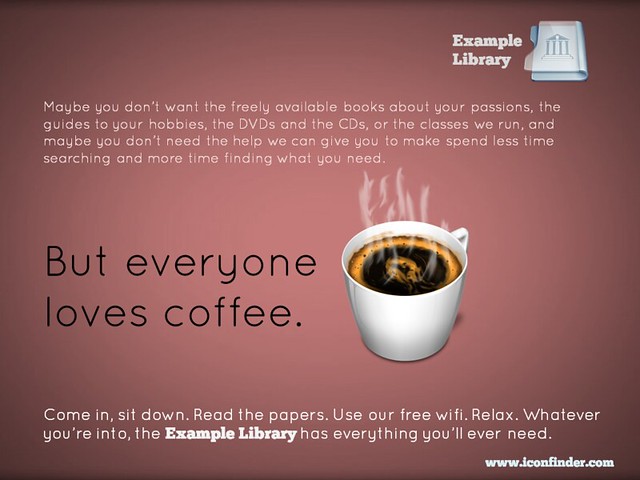
Finally, if you really want to put several library services into the same piece of promotion, you can do this and STILL have the one simple message for people to take away. In the example below, you're saying to people that the library is a welcoming place, that they can come in and use the wifi and enjoy the cafe, without being judged for not using the books and journals. But you're also listing all the other things they MIGHT do if they so desire. As I said above, much of marketing is to simply get people in the door - then you can give them a whole variety of reasons to say inside.

So remember, keep it simple. Market one thing at a time. It WILL yield tangible results.

(All of these posters are available on my Flickr account via an Attribution Creative Commons licence. Note that it's NOT a 'no-derivs' or 'non-commercial' license - in other words if you can find a use for these ideas, but want to change and adapt them to your own purposes, feel free to do so.)


Making your message stick - presentation skills for information professionals

On Tuesday the 12th of November I'm running a workshop on presentation skills in London. So many of us have to do presentations now, and it makes a big difference if you feel confident about it, and know some tips and tricks to make presenting easier and more effective. I'm really looking forward to it - it's the first time of doing this outside the British Library, where it's gone down really well. We'll be covering how to make lovely PowerPoints (even if you have to use a dreaded template), how to make your audience remember the things YOU want them to, tips for presenting itself, an introduction to Prezi and a bunch of other stuff too. You can read some of the kinds of things we'll be talking about in this 10 non-standard tips for public speaking post  and this presentation on making presentations...

It's hands-on, at PCs. The details, including a booking form, are here.

UKeIG website picture

One of my favourite ever pieces of feedback came for this course (it was unsolicited, too):

What I enjoyed so much about the presentation workshop:

 1.      Expertise in the subject matter

2.      Relevant and highly useful information: presented and practiced

3.      Clear and engaging presentation style

4.      Professionalism with a great sense of humour, no hidden agenda

5.      Dedication to collaborative professional development, to high standards, to excellence

... so I promise it'll be good! :) Hope to see you there.

Ned