Tech Guide

The famous comedian, the library, and the thoroughly modern echo chamber success story!

It's not all bad news and problems in the world of the echo chamber, sometimes things work out really well. One such success story had escaped my notice until today (apologies if you already know about this and it's old hat). Frank Skinner is a comedian and broadcaster. He wrote an article for the Times entitled Sorry, the demise of the library is well overdue. I am militantly anti-the-Murdoch-empire, and the article is behind the Times paywall, so I don't want to encourage anyone to give any funds to the evil cabal (who knows, they may well find their way into Fox News's coffers) - so why not read this response to the article, in the Guardian, instead? Anyhow, the response in the library community was typified by Phil Bradley's piece - sniffy of Skinner's worth as a cultural commentator and dismissive of his views. I can understand that. My personal reaction was different, however - I really like Frank Skinner,and I listen to his Absolute Radio show (in podcast form) every week. Moreover, I know from having read both his books that he is a: extremely intelligent (I think people assume his qualifications are honourary ones bestowed on a famous person - but no, he did an MA in English Literature, he used to be a teacher, and his is very articulate) and b: a really, really good writer.

Like Seth Godin's before him, Frank's piece was worrying for two reasons - firstly the factual inaccuracies (he said books probably carry diseases - this is a column to order in the Times, remember..) and secondly the fact that his views were probably representative of many (libraries have no role in the modern world). It's not enough just to say he's wrong (which, regardless of my personal appreciation for him, I can see that he was) - we have to address the fact that he speaks for a lot of people.

I tried to do something about it, as an advocate of the #echolib approach to responding to attacks on libraries (ie don't just talk to other librarians about how awful it is). My efforts were, admittedly, pretty lame, but I tried. I emailed Frank via the radio show and explained that his views of libraries were one-dimensional and out-of-touch with reality. I provided an analogy with people's views of him - because he did laddish comedy in the 90s and wrote Three Lions, many people think he is a lad with only blokey, basic humour to offer. He can do that, but he's got a lot more to him than many give him credit for. That, I said, is like libraries - we're known for books, and we DO do books, but we also do a lot more than the causal observer would realise. With that parallel in mind, I said in the email, perhaps you could visit a library this week, see what they're really like, and talk about it on air?

Anyhow, no doubt the show's producers weeded out the email long before it ever reached Frank Skinner, as it's hardly primte-time Saturday morning entertainment fare to read out on air. Elsewhere in the library world, someone did something a lot better - someone wrote Frank a letter. There's some details here - a Westminster resident called Don Mackenzie wrote to Frank, explained why he thought Frank's views on libraries were misinformed, and then invited him to Church Street Library to see for himself. And Frank accepted! This isn't even a librarian taking action, it's a library-user - library champions really are worth their weight in gold.
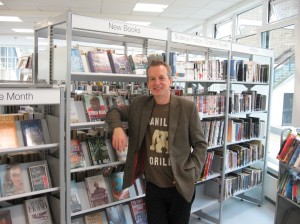
a pic of Frank Skinner in a library

The best bit of this story is what happens next. Frank Skinner wrote another piece about libraries for the Times, this time entitled: Why I’m on a new page with local libraries – it was my ideas that were dog-eared, not the places themselves. #WIN! In the piece, Skinner describes his fears about accepting the invitation because he was worried he'd be proved wrong, and then his eagerness to actually BE proved wrong when he reached the library. He goes on to basically be converted to the cause. Here's a quote:

The library had loads of computers. The general feel of the place was a cross between a clean, efficient secondary school and a cybercafé. No one was whispering. With the staff’s encouragement, I actually joined the library, and proceeded to choose a book. I wanted Tony Blair’s memoirs but that had already been stolen so I opted to reread Nineteen Eighty-Four. At last, George Orwell fans can reclaim the Big Brother franchise.

The smiling lady on the front desk pointed towards a machine on the wall. I put my newly issued card in a slot, scanned the book and got a slip showing the return date, which doubled as a perfect bookmark. I’m already seeing that date as a target. I work better with a deadline. Incidentally, I can return the book to any library in the borough and, you guessed it, renew it online.

I'd urge you to read the whole thing - and you can, because he's put the whole thing on his website. Yes that's right, it's not exclusively behind the Times paywall. The original piece was, mind you, but the retraction was not. How cool is that? Not only has this achieved the key echo chamber escape (that eluded us with Godin, Newsnight, KPMG et al) of the same audience reading the good stuff about libraries which originally read the bad stuff, but a BIGGER audience has read the good stuff because Skinner thought it important enough to put in the News section of his own web-page. Not only that, but I think a converted library skeptic is actually better news for the profession, overall, than if he'd never written the original article!

I really can't tell you how happy this whole thing has made me. :) Skinner has justified my faith in him, libraries have enjoyed a positive media narrative because of the whole incident, and many of our strategies for escaping the echo chamber have been shown to work wonderfully well!

w000000000t! That's all I can say. This also relates to the point that I keep harping on about whenever I'm given a platform - all we need to do is ensure that people can make an informed decision as to whether or not to use their libary. Not everyone needs libraries, that's fine. As long as people know what we do and can make up their own mind. Frank Skinner's opinion was based on a lack of understanding of modern libraries - when he obtained that understanding, his opinion changed. We need to do this, again and again, with everyone.

The Echo Chamber problem IS one we can all solve!

- thewikiman

Libraries & Stealth Advocising!

I'm afraid this post has a bit of a 'here's what I did, how cool is that' feel to it, but it's sort of unavoidable if I'm to share what I learned...

Stealth Advocising: creating material for library advocacy, but packaging it in something of intrinsic awesomeness so that non-librarians will be interested in it anyway - thereby extending its reach and escaping the echo chamber. Stealth advocising is the Trojan Horse of library advocacy.

The Background

Recently I've been thinking about the 'libraries and the echo chamber' problem a lot. (What a surprise!) Coincidentally, I also read that Lorcan Dempsey thinks the 'found flickr' style of slide-deck (which is what I normally do - I know it as 'zen-style slide-decks': full-slide images, one point per slide, the image being a visual metaphor of some kind for that point) is dead or dying. Then I saw NoteandPoint, a site devoted entirely to showcasing lovely presentations. The slide decks on there were sooo far ahead of what I normally do, it really made me think.

The Concept

All of this came together with me thinking a: I need to experiment with a different style of slides, to keep ahead of, or at least up with, the game, b: I've been meaning to contextualise my 'essential advice for new professionals blog post' into a slide deck for ages because it would be easier to digest and disseminate that way and c: wouldn't it be cool to make a deck so attractive it gets onto NoteandPoint because of its aesthetics, and then surreptitiously rights public misconceptions about librarianship at the same time! It's stealth advo-cising! Subliminal advocising, even! Because people will be viewing the presentation as a sort of cool object of PowerPoint beauty, without realising they're actually absorbing library advocacy! W00t!

This idea could apply to a lot of things. Make something which is cool enough of itself for people to want to share it, and it just happens to be about libraries too. What would result, if it worked, would be huge reach beyond your normal sphere, and people beyond the echo chamber learning about libraries. A good example of this in the past was when LibraryMan and David Lee King's Library 101 video got onto BoingBoing - that took more resources to create than most of us could realistically aspire to, but ANYONE can make a slide-deck.

The execution

Last week I created my slides, entitled If you want to work in libraries, here are ten things you need to know. I prioritised form just as much as function - this meant compromise, such as not saying as much as I wanted to in some slides, and dividing one slide up into 2 different ones because I only had 9 main slides. I wanted 10 because 'here's 10 things you need to know' is snappier than 9 - titles are really important. I made it short and easily digestible. I found a nice texture from Flickr (CC, of course), cropped it and re-coloured it to work as the background. And I used icons from the newly discovered icon-finder site (thanks Phil!)  to be graphics in roughly the same place each slide. The end result was a deck built for echo escapism - it is pretty, and although there are compromises on content they are necessary to help it achieve wider dissemination - less stuff, but seen by many more people, = #win. It's concise, honest, makes important points I'm always making, and will hopefully put off as many people as it entices into librarianship. No point in people entering this profession labouring under misapprehensions.

The deck

Here it is:

What happened next

All I can say is, this went waaay better than I expected! I wrote a blog post yesterday asking people, how do I get this slide-deck beyond the echo chamber? Almost exactly 24hrs later, thanks to a mixture of the suggestions people gave me on Twitter and on the blog, and just trying stuff at random, here's some of what has happened:

Screen-grab of three Prospects Tweets

Pic of a tweet

Pic of a tweet

Pic of Slideshare

Pic of an email

Pic of Slideshare

Pic of slideshare

The combined reach of those Twitter feeds alone is over 6000 followers, NONE of whom follow me and so were inaccessible to me otherwise. And all I did was just ASK them to tweet it - that's all there was to it! Why have I never done this before? The Prospects Twitter person in particular was really helpful and engaging, and got my feedback on other stuff they were doing online at Prospects, and tweeted links to my Essential Careers Advice post and my Prezi on libraries and technology.

The Slideshare featuring thing is amazing, because every time anyone goes to the homepage they can see an attractive presentation, check it out, and are fed pro-library propaganda through a straw while they do so... As they said in the email screen-grabbed above, they receive thousands of uploads each day - the only way they even know my presentation existed in order to put it as a Feature on the homepage was because it got into the Hot on Twitter section as one of the most tweeted about Slideshare decks in the world for that morning so,thank you to everyone who tweeted and re-tweeted the links! The pictures above show just the #echolib busting stuff - it was also picked up on by loads of library people too and I'm really grateful.

Another thing worth noting is that, at the moment, if I type 'I want to work in libraries' into Google, the first four entries I get are this presentation. (Same with typing in 'if you want to work in libraries'.) I know Google personalises results but even so, that's pretty good - I'd rather people got my opinions on the truth of working in libraries than some out-of-date stuff that perpetuates the misconceptions, stereotypes and so on.

The numbers

At the time of writing, just 24rs since being uploaded to Slideshare, the presentation has been viewed 2611 times, linked to via bit.ly 345 times, embedded in 18 people's sites and blogs, tweeted 69 times, downloaded 13 times, shared on Facebook 48 times, liked on Facebook 66 times,  favourited 10 times on SlideShare and even received 7 votes for Slideshare's World's Best Presentation Contest 2010!

WOOF!

To put that in context, the next most viewed presentation I've ever submitted to Slideshare has less than 1000 views, and that's EVER - let alone in 24hrs. So stealth advocising undoubtedly increased my reach exponentially, and hopefully it enlightened many of those new viewers as to what libraries are all about.

Your turn?

So, how else can we apply the stealth-advocising principle and help libraries escape the echo chamber? Suggestions in a comment please, or better still, make it happen and post a link to it here! :)

- thewikiman

How can I get this presentation seen outside the Echo Chamber? (Or: If you want to work in libraries, here are 10 things you need to know...)

I've created a presentation which takes some of the essential careers advice for new professionals post, and re-contextualises it as: here is what you need to know if you want to work in libraries.

The idea is that it will serve four purposes.

1. It'll be of interest to existing and new professionals, maybe create some debate or heighten awareness of certain issues 2. It'll entice more dynamic peoeple into considering librarianship as a profession, by righting  a few misconceptions 3. It'll put off some of the meeker people who may labour under misapprehensions as to what librarianship is really like (I'm very happy with this ambition - we have too many over qualified pros as it is, so why not head people off before they waste time and money in a profession that isn't like they thought it would be?) 4. In the course of 2 and 3 it may increase awareness as to what Information Professionals do these days

I've deliberately tried to make the most aesthetically pleasing presentation I'm capable of, in order to increase the chances of people picking it up! And make it very concise, too. For numbers 2, 3 and 4 to really be achieved, I need this presentation to go way beyond the reach of this blog and my twitter account. With that in mind, if you know of anywhere that could display this presentation, or link to it, please let me know! Anywhere at all. I want ideas as to how to get this beyond the echo chamber, I'd love to see some in the comments... And also, if you'd like to embed it in any sites or blog of your own, please please feel free to do so - the code to embed it is available from the Slideshare page. I'd really love to see it in as many places as possible. :)

- thewikiman

Using Netvibes to collate your online presence

If you have multiple spaces online, Netvibes could draw them together for you. If you are involved in multiple projects, particularly those which involve content from other people and from the library community, then Netvibes really comes into its own! This is essentially a post about discovering a really useful too, which I'd heard of but never previously understood. Some context: I couldn't attend Internet Librarian International this year, but luckily a lot of people on Twitter did. I think it was Bethan Ruddock whose tweet I saw, drawing attention to the fact that Phil Bradley now points people towards his Netvibes page as his 'home page'.

I've looked at Netvibes before, particularly around the time CILIP set up the 'cilip future' dashboard, but never found a good use for it - all it seemed to do for me was display the results of a bunch of key-word searches. But then I saw Phil's public page and it all made sense... I still don't use the private page (iGoogle does sort of the same role for me) but I've now set up a public Netvibes page - check it out at www.netvibes.com/nedpotter - and I'm really pleased with the possibilities it opens up. On the one hand, I'm loathe to add YET ANOTHER online place for people to go to, as my e-dentity (has that been used before? If not I'm gonna trademark it :) ) is fragmented enough as it is. But what I've found Netvibes does for me is aggregate all these online presences into one place, and also allows me to draw together the various projects I'm involved with. I've been meaning to update my website for ages, and I will still do so - but in the meantime, it's massively quicker to drag and drop some content into Netvibes than to bash away at DreamWeaver for hours to edit thewikiman.org. I figure I'll still give my blog URL out as my 'primary' address, but will give out the Netvibes one if people are particularly interested in an aspect of what I'm doing (whether that's Library Routes, LISNPN, the Echo Chamber thing, or anything else).

A picture of my Netvibes Public page

So, my Netvibes page currently has four tabs - the 'General' homepage contains a little bit of free text and a picture, and then links to a few things such as thewikiman.org. Mainly though it contains embedded content drawn in from all over the place (all which will of course be updated in real time as it changes elsewhere) - my Twitter feed, my blog feed, my Youtube videos, my flickr pics, a precis of my LinkedIn profile, It also contains a presentation from Slideshare,  and the papers and presentations page embedded from thewikiman.org. This gives people an enormous amount of stuff from which to build a picture of me and my professional activities.

The way in which Netvibes has really convinced me, however, is with the other tabs. The Echo Chamber tab, for example, gives a far better summary of the whole thing than is available anywhere else online. There's some free text explaining the concept, there's the Prezi presentation that Laura Woods and I created and are adding to as we go along, there's a blog search and a twitter search on the subject, and there's my one-page article from Library & Information Update which explains the whole thing. This is the first time I'll have had a URL to point someone towards which pulls everything together. I know that my own website could (and probably should) do this, but there are two reasons why Netvibes works better - firstly it would take time and expertise I don't have to embed all that stuff on my own site, and secondly I feel that this netvibes platform is better for bringing in content created by other people (which is to say blogs, tweets etc) than my own website, which somehow wouldn't be appropriate.

I've created a LISNPN tab and a Library Routes tab which work in much the same way, and will soon be adding one for my actual day-job too. Take a look and see if you think Netvibes could do a similar job for you.

If you agree it might be useful and are anxious to get started, here, as ever, as some top tips I discovered through trial and error which I'd have like to have known from the start:

  • Enable your Public profile right away. You don't have to tell anyone it's there until you're ready - but I spent ages mucking about with my page before realising it was only the private one. I thought I could 'make it public' but you have to create a separate public one, so I had to start again...
  • Use the Settings Menu to choose a theme. It's in the top right hand corner - choose something you like early on and then arrange the content to suit it
  • Tabs = good. The 'general' default tab is great for giving a summary of all your online stuff, but if you have particular projects or areas you're involved with, give them their own tab. That way if someone asks you about something specific, you have a URL to point them to directly (rather than just saying 'it's own my website' which can come out like, 'go look for it yourself'.)
  • You can edit the tab layout easily. Each tab has an 'edit' button - click this and you're given options as to how the content will be arranged. Number of columns, whether stuff goes all the way across the page or only part of the way, etc etc. It's easy to pick a layout that suits whatever you have on that particular tab - so don't be trying to crowbar a massively wide website into a half-screen column when you don't have to.
  • Before you embed a website, see if there's already a widget for that site on Netvibes. Here's the Essential Widgets menu (which you get to by clicking 'Add Content' in the top left corner):

    A picture of the Widgets dashboard on Netvibes

    So Twitter, LinkedIn etc - it's all there for you, just drag the widget where you want it to go, put in the relevant URL and it does the rest for you. Some sites, such as Slideshare, aren't represented in the widgets - for those,  you can use Link Module (not sure if you can see it on the pic above - it's top row, just to the right of centre, next to Web Page) - this creates a little thumbnail of the site, which looks nice. (You can see an example for my own homepage, in the middle at the bottom of the picture.)

  • Use the Webnote widget to introduce the page. You don't need any knowledge of HTML or programming to throw your page together. If you use the Webnote module (top left in the Essential Widgets screen-grab above) you can just type into it normally - I use it at the top of some of my tabs to just give a brief outline of what that tab is about.
  • Use the search widgets. On page 2 of the Essential Widgets there are various 'search' widgets - search the web, search images, search videos, search blogs, search Twitter etc. These are great for pulling in content from other people, to give wider context about a given topic. You can say what you think about something, and you can show what other people think about it too.
  • For the blog search function, use IceRocket. I've never heard of IceRocket before, but when you use the Blog Search widget, you get by default several tabs, referring to different ways of searching blogs for the same topic. I found that the IceRocket tab produced by far the most relevant and pertinent results, more so than Google Blogsearch. I've mostly got rid of the other tabs and just kept IceRocket, or in a couple of cases IceRocket and Google Blogsearch.
  • And that's it! Have fun.

- thewikiman

You want to work in libraries? Essential Careers Advice for New Professionals

Recently I've found myself giving out some careers advice, as part my role as a New Professionals Support Officer for CILIP, and as a follow up to the New Professionals Information Days where people have emailed me asking for guidance (and some of the below is stuff I said in my talk on technology). My career is by no means a shining example to follow, but I do know about a lot of resources or ideas which could help people just starting out in Libraries. A picture of a 'library careers' magazine

I've created a seperate page on my website which draws together the advice below, along with the advice from people in the comments too - you can view it here. The following is the original blog post:

  1. Work *really* hard. I know this is obvious, but you'll be surprised how hard you have to work if you are to get anywhere. There are enough talented, focused and hard-working individuals in this field who will be going for the good jobs, so you have to work very hard to keep up with them unless you want to stagnate - that may mean doing stuff in your own time, including unpaid work-experience in the department you want to work in (even if you already work in the library elsewhere). Librarianship is NOT a soft option - if that's what you're after, stop reading this now and go and look for an alternative career.
  2. Get focused work experience. This really good post from Library Hat reminded me of how important this is - the job market in libraries is so competitive, it's no longer enough just to have worked in libraries generally. You need experience directly relevant to the career path you want to take.
  3. Plan to do the Masters. Forget the merits or otherwise of the LIS Library Masters, forget the fact that most job descriptions will ask for it 'or significant experience'. Just bite the bullet - pretty much everyone entering the profession now who is in it for the long haul, either has or will soon acquire a Masters in Library and Information Management or similar. It is expensive and time consuming, it's of questionable value, and it won't necessarily prepare you for the proper world of working in libraries - but for now it's absolutely essential. The sooner you get it, the better. Here's a list of the places that offer it in the UK (and here's one for the US), including Distance Learning options which a lot of people are choosing now. I can understand if the prospect of doing another qualification, and all the sacrifices it entails, puts you off the profession; that's fine. But don't continue working in libraries without intending to acquire the Masters at some point if a: you plan on sticking around and b: you plan on getting anywhere. (On Twitter, @bibliopoesey asked if it matters where you do the Masters. In my opinion: not THAT much - it's a vocational degree, so that kind of hierarchical system of Universities doesn't seem so important. That said, UCL and Sheffield appear to offer a considerably better course, so go there if you can! But you're not going to be denied a job because you did it at Northumbria, or wherever. Just my view, I may be wrong.) [NB: Please see the comments section below for more on this - it may be that planning to do some kind of Post Graduate library qualification is sufficient: ie you could do a PgDip rather than a full MA/Msc, which is shorter, cheaper, and not subject to new UK laws about increased fees for those who already have a Masters.]
  4. Be prepared to start near the bottom. Because you need a Masters to get a good job, and you usually have to have worked in libraries for a minimum of one year to get onto the Masters, it's almost impossible to start anywhere other than near the bottom. That's actually a good thing - it connects you with the customers, who are what the whole thing is all about (it becomes easy to become detached from that as you move highter). Graduate Traineeships are a good way in - but as @Naldasaid pointed out, there aren't too many of them. Don't worry if you can't get onto one, just start off in Customer Services (or as a Library Assistant or whatever your organisation of choice likes to call it) and apply to do the Masters after a year anyway - just try and make as many opportunities as possible in that first year (by shadowing people, trying to get involved in committees, or doing extra-curricular stuff like serving on your local CILIP Career Development Group committee or getting an article published). You undoubtedly get a broader experience by default as a Graduate Trainee, but by the time your career is three or four years old I'd be surprised if you'd be significantly disadvantaged by not having been one. I certainly haven't been - I started off in Customer Services, and then got a better job as a Project Assistant 10 months in. Project work is great if you can get it - you can be in at the start of something, which often leads to greater responsibility and the chance to use your initiative.
  5. Proactively anticipate your career needs. It's very little use trying to acquire some kind of expertise, experience, or training, after you've seen the job you want advertised. You need to have already done it before you apply - so anticipate what you might need to know, and start learning about it even if you don't require the knowledge for your current role. This could be something as simple as going on an Advanced Excel course when you get the chance, to a more strategic process like going for a Subject Team Assistant role if you want to end up as a Subject Librarian, even if that means moving sideways. Get hold of a generic job description for the next role you want, and start ticking off all the boxes in the Essential and Desirable person specification so you can strike when the position becomes available. Then, get hold of a job description for your IDEAL job, even if you're 20 years away from being able to apply - it's never too early to know what expertise your career will need.
  6. Join a professional body. I can't emphasise enough how valuable I've found an awareness of the wider profession, and for me that awareness comes from two things - professional bodies and social media (more on which below). So join CILIP, or IFLA, or SLA, or ALA, or whatever body is most pertinent to your ambitions, and devour all the information and connections they have to offer. Most organisations have cheaper rates while you're a student or earning under a certain amount, so take advantage while you can!
  7. Acclimatise to the fact that this is a people profession. As @jaffne points out, it's not a book profession, and as @Girlinthe points out, it is a people profession - we are part of the service industry, just in a sometimes-quite-intellectual way. You cannot work in this industry if you don't like people, if you can't solve problems, if you can't keep smiling. If you're painfully shy then that's something you can work with and overcome - if you just want to sit quietly surrounded by lovely old books, you are completely screwed.
  8. Acclimatise to the fact that this is a technological profession. Technology is the one thing, apart from problem-solving, that runs through every role or job that the library pays the salary of at the end of each month. Almost every single role needs a good grasp of technology (even the ones you might not think would do, like being a Convervator for Special Collections for example). Here's a guide to what technological expertise is needed in which areas of the library. If you're not comfortable with technology now, that's okay - just throw yourself into it. Fear comes from unfamiliarity, so take that away and you won't be scared anymore.
  9. Acclimatise to the fact that this a profession in transition. Change is a constant in libraries - there's been more change in the last half-century than in all of previous library history put together. Get used to change early, and plan for the future always. Part of that change means we have to be more agressive than in the past - the days of running a library like a charity are gone. They need to be run like businesses and aggressively marketed - and you need to be prepared to market yourself, build some kind of brand, and put yourself out there. (I dread to think what I'd've said to someone in 2006, on my first day of the job, if they'd've come up to me and talked about marketing and building a brand - I probably would have laughed at them, or called them a tosser. But it's the reality, and it's more fun than you might imagine. :) )
  10. Attend events. Meet people, learn stuff, make connections, understand more than just your own library world. Social Media will help you find the best events to go to, as will membership of a library body.
  11. Join LISNPN. I created a network for LIS New Professionals - it's full of events listings, how-to guides, information, and other new professionals (around 560 at the time of writing). Wherever you are from, join it - we can try and answer your questions, attend to your needs, we organise face-to-face meet-ups, and we'll connect you with the wider profession.
  12. Get yourself on Twitter. Twitter is an invaluable source of networking, links, information and support. If you're not on it, it's probably different to how you imagine it is - it's much more interactive, and much less vapid. Make time for it and you'll have so much more understanding of what's going on in the Information Profession; here's my guide on how to get started. If you want to set up a blog too, even better - here's another guide on how to do that, and on the importance of an online presence.
  13. Diversify. There is no career ladder in this industry; think of it as a career climbing wall. Sometimes there are no hand-holds directly above you - you have to go sideways or diagonally, but the most important thing is not to get stuck. Keep your eye on the job you want, and keep moving upwards in the meantime - sometimes there is no direct route from A to B so you have to diversify. One thing is for sure though - no one (or almost no one) ever went right from a Grade 3 entry level role to a Grade 7 professional role. You need to cover some of the ground in between - and library careers often don't develop in a linear fashion.
  14. Value yourself. Things have changed over the last few years, and New Professionals are increasingly recognised as being worth listening to! We have a voice, we have networks of support. Don't put up any kind of wall between 'us' and everyone else more senior - but be confident from the start that your opinion is of value.
  15. Make things happen for yourself. If you've got a good idea or a wish, don't wait for someone else to make it happen. Today, with social media and Web 2 tools, you can probably make it happen yourself. Just do it, and professional development will almost certainly follow. An example of this is the Library Routes Project, set up by me and Woodsiegirl - take a look, you may find it useful, as it documents people's routes through their library career (including how they got started). We just decided to do it because we thought it'd be useful - now it has around 150 entries from librarians all over the world, and has been viewed by over 23,000 people.
  16. Find something in librarianship that matches your existing interests. You'll be amazed at how diverse interests can be accommodated as part of your library job. Whether you're a wannabe writer (write some articles for professional publications) or a fan of 16th century textiles (work towards becoming the archivist for the 16th Century Textiles Society..) you can drag your existing interests into your job somehow. It's what helps make it a vocation rather than just a job.

...

Any more essential tips? Let me know and I'll add them to the permanent page.

- thewikiman