How to

A Beginner's Guide to Instagram Reels, Stories, & the Grid: what to post where

Instagram is a fun place to market a cultural org, but it’s also a complicated space in which to work. It has so many layers and ways to post, and to a certain extent they all work together - which just makes it even more confusing to people trying to get the most out of the platform! It all makes Twitter seem very straightforward by comparison.

It is worth trying to do Instagram well, however. It’s worth taking the time to familiarise yourself with what each facet of it does, and then craft content for your audiences.

Before we go into the details, let’s look at how an Instagram account is displayed to its audience.
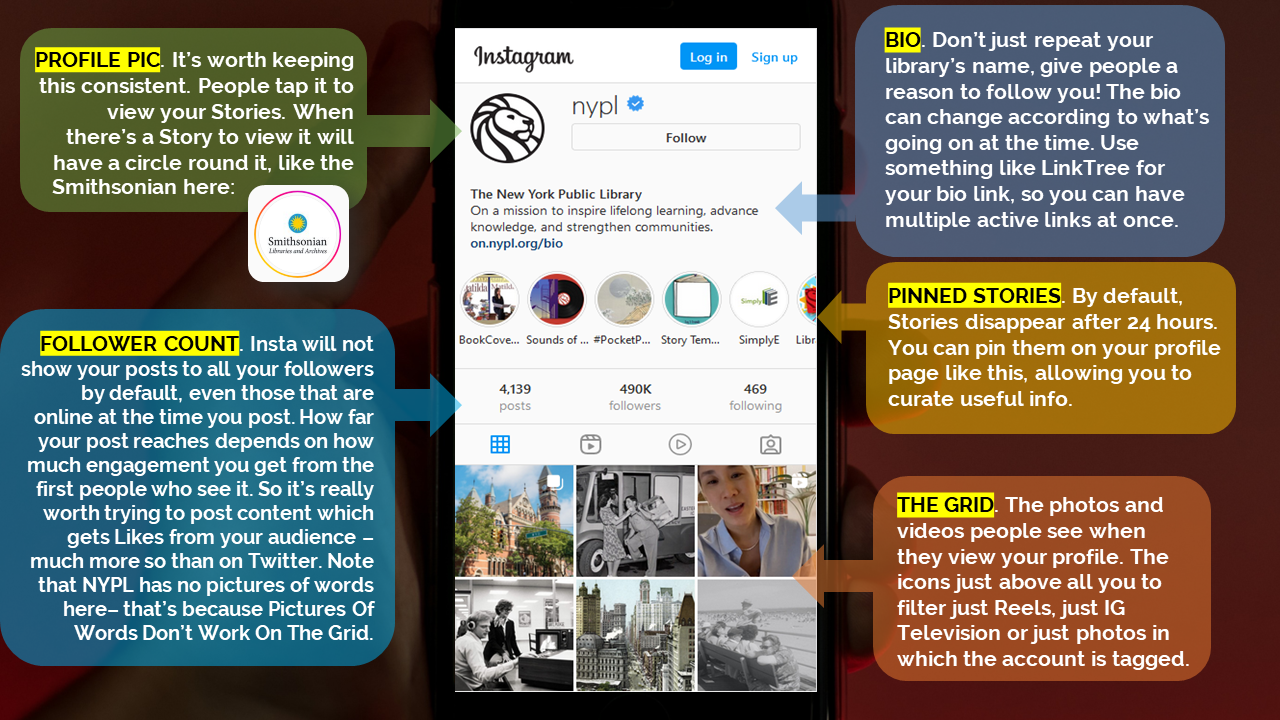
Screenshot @NYPL on Instagram, overlayed with contextual info. PROFILE PIC. It’s worth keeping this consistent. People tap it to view your Stories. THE GRID. The photos and videos people see when they view your profile.

(Click the pic to open a larger version in a new window)

So, what do you post, and where should it go? At the time of writing, there are four ways to post Instagram content.

The Grid

The Grid is the bread-and-butter, the ‘main’ posts you put on your Instagram account. It can be photos or videos. It’s what people see when they click on your profile. You might post a few times a week to the Grid, even if you post more often to Stories.

In the library world, it’s photos of interesting things that do well here, rather than incredible photography per se. A perfect shot of a book, taken on an expensive camera, will reach fewer people than a nice picture of your library’s interior taken on your phone.

Remember: pictures of Words do not work! Shots of library interiors seem to do really well, as to shots of library exteriors… Archive photography is always popular. It’s worth noting that not all your posts have to be about your library: images of the geographic location you’re in are often popular, as in this Liverpool Uni Library example.

Shots of objects from Special Collections often get engagement, like this one from the BL.

Stories

Stories are 15 second videos (or a longer video broken into 15s chunks) or a 7 second-long still. They’re orientated as portrait rather than landscape or square. because they’re only really intended to be viewed on phones. They can have music and gifs and animations and - crucially - links, added to them, natively in Instagram. They do NOT appear on your grid; they’re found when people click your profile pic. They disappear after 24 hours - but they can be pinned in themes to be found later by the more curious among your followers. And the more you use them well, the more your account will grow and the greater your engagement will be with your audience… Got all that? Just in case anyone is still scratching their head, the next post in the Instagram Mini Series will be All About Stories in more detail.

Reels

Reels are a brilliant opportunity for all of us. There’s a whole post on Reels coming up, but in essence they are portrait videos, maximum 90 seconds long, and massively favoured by the algorithm. They’re shared waaaay more widely than any other type of Instagram post - the reach will be several times that of a regular video or image. (Confusingly, Reels also appear on your Grid unless you disable this, but let’s not dwell on that now!)

Here’s the kind of content that seems to suit Reels well - firstly the Book Sorter POV video which I made by literally blutacking a GoPro to a book! It’s not serious, it’s a bit silly, but it’s also introducing people to the Book Return machine by stealth…

Music is important in Reels, so the second video with shots of the library cut to fit with the music behind it, is a type that can work well.

Instagram TV

Instagram TV is almost not worth worrying about at all. It use to be IGTV and was the home of any videos longer than 1 minute. It didn’t really work, no one watched it, so they rebranded it to Instagram TV at the end of 2021 and now all your videos go there, regardless of length - except Reels. It’s really little more than filter now - people can click on the relevant tab on your profile and see all your videos (except your Reels!) in one place - but they can find them all on your Grid anyway. The thing about regular videos - rather than Reels - is that they simply do not get seen. Instagram doesn’t share them. So even brilliant videos won’t find an audience.

The tl;dr is, focus your energies on the Grid, Reels, and Stories.


This is Part 6 in the Instagram Series. Read Parts 1 - 5 if you’re interested.

Everyone is posting pictures of words to Instagram... and nobody should

Part 5 in the Instagram Series. Read Parts 1 - 4 are here. If you want. No pressure.

If there’s one social media rule that is universal across platforms, industries and sectors, it’s this:

Learn what your audience likes, and do more of it.

The other side of this coin is, of course, to do less of what your audience doesn’t engage with. It’s incredibly easy to follow these maxims; you don’t need pay for any tools or be an analytics guru. Just click on your posts and compare their views / reach / impressions and you’ll quickly learn what works for your community, and what doesn’t.

With that in mind, cultural orgs please, please, please:

Stop posting pictures of words to instagram

I see it happening all the time and it never gets engagement - which means, essentially, almost no one sees the message. You know the sort of thing - photos of book covers, or motivational quotes, or graphics, or photos of signs, or ‘resource of the week’ posters. And in every single case, there’s a massive drop in Likes compared to when they post ‘captured’ images (rather than created ones) of buildings, or spaces, or interesting objects.

If you visit any Instagram profile on a PC (rather than on your phone) you can hover over a post to see how many Likes it has so you can see for yourselves. Go to literally any library, HE or museum Insta account and do some hovering. A new account still finding its feet might get 20 Likes for a picture of a building, but only 4 Likes for a Picture of Words. A really, really successful account with a big following might get 200 Likes for a Picture of Words! But hover over the captured picture of the interior of their building next to it, and you’ll see that has 780 Likes. It’s the same everywhere.

Why does it matter?

In short: if you want a message seen, it needs engagement from your followers because Likes equal Reach.

Instagram is not as straightforward as Twitter. If you follow me on Twitter and I post at 1pm and you’re online at 1pm, you’ll see my post. Instagram is a lot fuzzier, and will not just show your posts to your followers in a simple way - the more people engage initially, the more of your followers will see it.

Likes, Comments and Shares are vital as the more you get, the more people Instagram’s algorithm will show your post to. A really important message about the library closing early simply won’t reach anyone if it’s just a screenshot of the words ‘the library is closing early today’ because no one will hit Like. So no one knows you’re closed early!

Have a look at this comparison from my library’s Insta account. This isn’t quite a full ‘pictures of words’ because we don’t post any, but it’s an example of an unsuitable picture for Instagram and shows you the impact engagement has on reach. For various reasons that I won’t bore you with now, I posted a picture of a case that I absolutely knew wouldn’t get much engagement. It’s a great photo but it’s not OF the kinds of things our audience respond best to, so as a result it got a very low number of Likes. Next to it is a more regular post, of our buildings looking dramatic at night, which got many more Likes.

A briefcase pic with 15 Likes and reaching 392 accounts. A building pic with 95 Likes, reaching 834 accounts.

The heart symbol represents Likes, the Quote symbol is Comments, the Arrow symbol represents people Forwarding the post, and the Bookmark symbol is people saving the post to their Favourites.

The key thing to look at is of course Accounts reached: 392 for the case, and 834 - over twice as many - for the building. So it’s not just a bit of a shame we didn’t get more Likes for the briefcase post; it’s ineffective communication that is only getting to a fraction of the target audience.

We all have key messages. We all have things which we need our audiences to hear. Not all of them have suitable visual metaphors. So how do you get those messages out?

Use Stories Instead

Option 1 is to take the words and put then into a Story.

Words work fine in Stories, people expect them. Especially anything time-sensitive, pertaining to events that day - just use a Story to spread the news.

The more you use Stories (for the kinds of things you might use a tweet for) the more your audience comes to expect you to use them and looks out for them.

When we ask our students how they get updates from the Library, every single undergraduate - every one - says Instagram Stories.

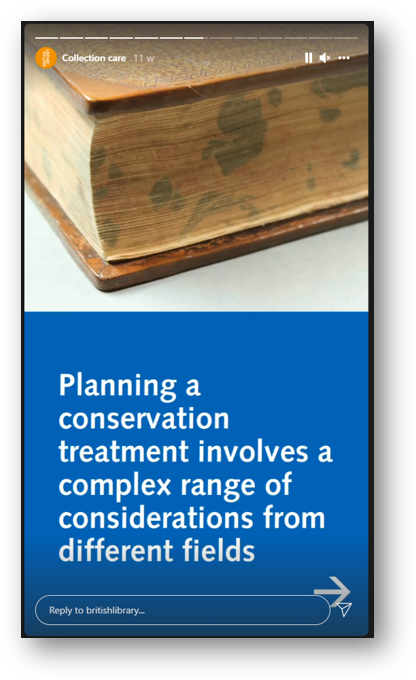
Screenshot: planning a conservation treatment involves a complex range of considerations

Here the BL are using several Stories in a row for a larger narrative - most users are happy to tap through a few Stories in a row if your message is too long to fit in one screen

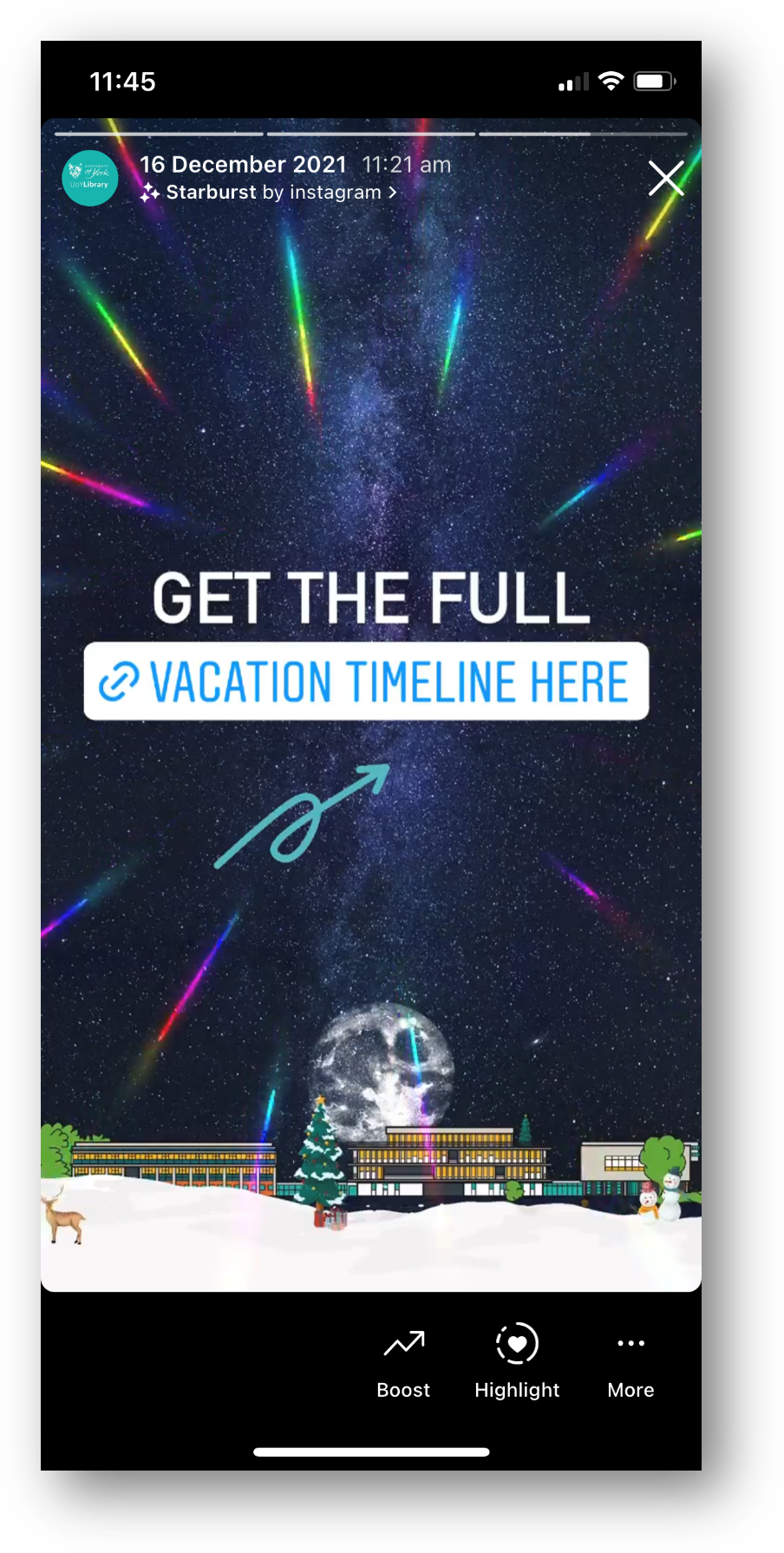
Remember Stories can have URLs in, unlike Grid posts - so you can post a few words and a link to more information

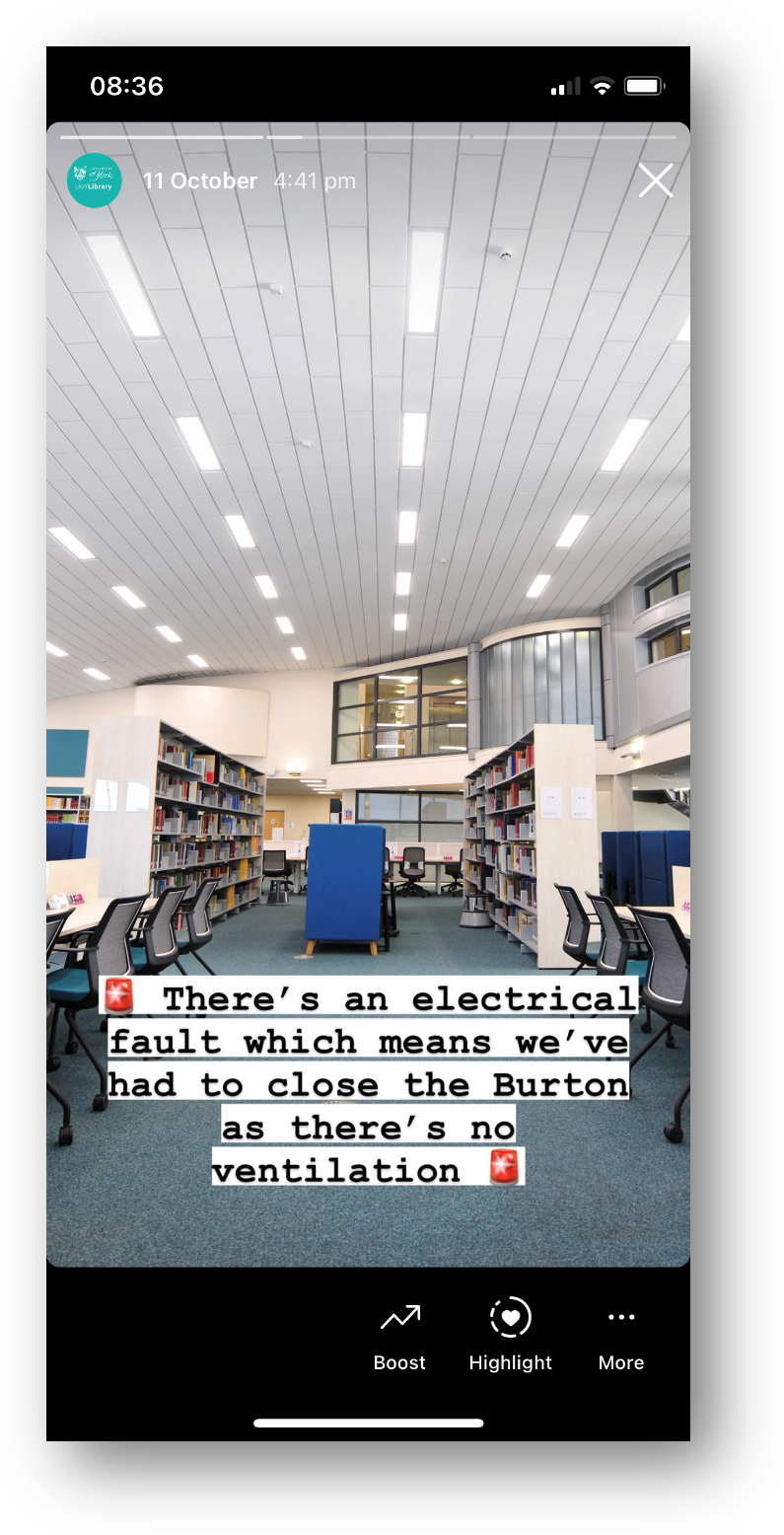
Screenshot of a Story - picture of a library interior, with 'there's an electrical fault so we've had to close the library' written across it

A classic Not That Interesting But Still Important post, which wouldn’t work on the Grid but is perfect for Stories

Use the caption

Option 2 is simply to pair the message with a good picture and more people will see it. Obivously Instagram is a visual medium but you can use the caption for detailed info if the situation warrants it - just phrase it in an engaging way!

Does the picture have to match the news in the caption? No it doesn’t. It’s better if it does, but it’s not essential - what’s essential is choosing a pic people will Like, so more people get the news you need them to hear.

Here’s an example from my library of using a pic for reach, but the caption to deliver important messaging. I was so pleased with this picture when I took it - the colours were just good that day with the bright sun and blue skies and green grass - that I didn’t post it right away, I saved it for exactly this kind of situation where we needed Reach.

Post multiple images, and keep the words of the ‘front cover’…

Option 3 is to get creative by smuggling Pictures Of Words in as part of a post with multiple images. Here’s an example of this - I took a nice picture of the library in the sun, and then used multiple further pictures with words on, and the caption, to tell the audience the info I needed them to know. It got lots of Likes and so lots of people saw it - which absolutely would not have been the case if I’d just posted the Zones-related graphics.

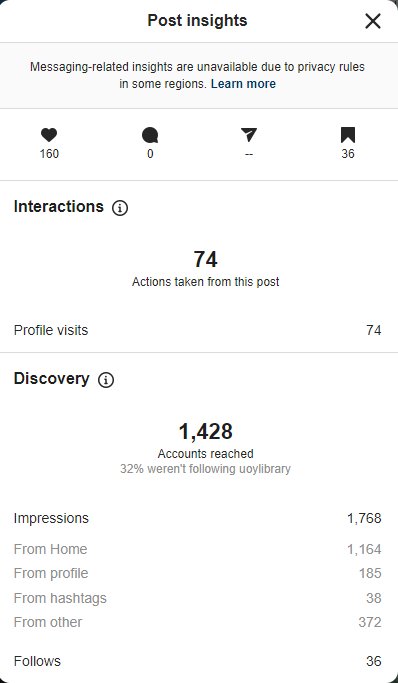
Here are the Insights for that picture. As you can see the accounts reached figure is higher than the previous examples - 1,428 - because of the higher levels of engagement. It’s not just the 160 Likes, it’s the fact that 36 people Bookmarked it, 74 people visited our profile after viewing the picture.

You can also see that 32% of the views were from people who weren’t following us, and that 36 people followed us directly as a result of seeing this post - so Reach helps you find users who didn’t yet know you were on Instagram, as well as ensuring as many existing followers see key messages as possible…

Insights, showing 1,428 accounts reached, 160 Likes, 36 Saves, 36 new follows

I really hope I’ve convinced you not to post ‘created’ images or pictures of words from now on! If you’ve been doing so up till now don’t feel bad, because EVERYONE does it. But do yourself a favour, reach more people, and do more of what your audience likes.


I’ve run a lot of in-house workshops for various cultural organisations, in which I audit their social media and come up with recommendations, working with staff on what they feel comfortable implementing. If you’d like to discuss social media training, get in touch!

Instagram guidelines for libraries

After a brief departure last time to mark the 10th anniversary of my becoming a library trainer, this time we’re back to the Instagram Mini Series. Click that link for the previous 3 entries, all of which focus on why to have an account.

Sharing our own Insta guidelines

For this post we’re moving on from the Why to the How. Specifically, how my library - @UoYLibrary on Instagram - does things: an org approached us and asked to share our internal guidance doc with them, and after some discussion amongst ourselves (and a senior manager) to check everyone was comfortable with this, we did so.

At that point we thought why not share them more widely for anyone else who is interested? So here they are - there are some caveats and context below but if you just want to see the doc, this is the doc:

>>> University of York Library’s Instagram Guidelines.

There’s a lot of stats towards the end of this post on the impact adopting these principles has had on our own account, but in short, using these guidelines we’ve increased our Instagram reach by 1149% in 12 months. This stuff really works!

The caveat

This is an internal doc. It’s literally just the guidance I wrote for York staff who help me do the Instagram. So that means it’s not a definitive all encompassing guide! There are probably things we’ve talked about internally which everyone knows, so it’s not codified here. Also, we’re an academic library so it may be skewed towards that sector. Generally speaking though, I think pretty much everything here is applicable to any non-profits using Instagram.

Another small caveat is, I’m not trying to present York’s Insta as the finished article, the account to which everyone should aspire… We’re still learning, still improving, still trying to increase our reach. We don’t nail everything, we still post things people don’t respond to. We’re a work in progress, and this post is really about how to make that progress happen.

The context

Our Instagram was created in 2016 by a Comms Team rather than by us in the library. We finally got control of it ourselves in mid-2017. From that point on it went okay, gradually building up followers and levels of engagement but not setting the world on fire.

From the time of the pandemic starting, I started to spend much more time actively involved in the social media rather than just writing the guidelines, and our Instagram use increased accordingly. We posted a lot more to the Grid, essentially tried harder and, frankly, started to do more of the things I was always telling other libraries to do in social media workshops. It worked well, but it was still very much in the shade of our Twitter account, and not quite hitting the heights we wanted.

Exactly a year ago, I decided that we needed to invest more time in Instagram and make it work better.

Instagram is absolutely essential for reaching undergrads

It is THE communication channel on which to get messages to undergraduates, nothing else comes close. Our Twitter was doing really well and was where we put the most time, and all that time paid off with lots of growth and engagement - but I did some follower analysis and, at least among those who engaged by replying and quote-tweeting us, it was clear that our audience there primarily consisted of PostGrads , Researchers and Academics. So our key social media messages were not getting through to UGs, and Insta is the answer to that problem.

In 2021 I co-presented at an event with Liverpool Uni Library, whose social media really is something of a gold standard in academic libraries, and before the event we chatted on zoom - they had grown their Instagram massively in recent times, which made me think perhaps we could do the same. So I asked my colleague Rebecca Connolly to go on a little fact-finding mission and check out Liverpool, Glasgow and other Uni libraries with good Instagram engagement went about their business and what we could learn. Rebecca produced a brilliant report and we set to work on transforming our Insta into something much more effective for getting key messages out to UGs in particular - a process which is still ongoing.

How we changed our Insta

Some things we tweaked right away, like following more York based accounts, and using Stories a lot more. Using Stories is key and I really feel like it was something I didn’t understand well enough before Rebecca became involved with the account at York; she is an essential part of the progress we’ve made. Stories are so good for newsy items, and the more success you have with Stories the better things seem to go on the Grid too.

Other things evolved over time, like avoiding the use of words and graphics on the grid (only using them on Stories), and making sure to pair big announcements in the captions (NOT the picture) with visually arresting pictures of the library.

If you’ve not read the guidance doc linked at the top of this post, have a look - we basically did all the things in that document! In addition to all that, we’ve created and posted a lot more Reels (you can see all our Reels videos here), and also tried some fancy split photography, that involves dividing a wide-angle shot up into even squares so it can be seamlessly swiped through. Here’s an example of that I posted yesterday which I really like…

The results: our increased Instagram engagement

With any kind of social media, I’m always looking for engagement rather than follower numbers. I want more followers of course - a larger audience of students and staff for our key messages - but they come naturally as a by-product of posting stuff which gets engagement. So for Instagram I’m looking at Likes, Comments, Shares, and Reach, and hoping that if we increase those our followers will increase at the same time.

As it happens, our followers have increased by about a thousand people in the last twelve months. That’s great. More excitingly for me, is that the number of Likes has gone up 42%, despite us posting slightly less frequently overall, so the Likes Per Post has actually gone up 69% - in essence meaning we’re posting stuff the students actually respond to, more of the time. Over 2 years, our total number of Likes have increased by over 350%.

Shares are way up, and Comments also increased which is great because we want that interaction and chance to answer questions - up over 600% over the two years. What isn’t captured by the analytics is the amount of DMs we’ve had - either just messages out of the blue or responses to questions in our Stories. I can’t get figures on this without manually counting but the increase is huge - people love feeding back one-to-one on Instagram.

The reach is the thing that most amazed me though - an increase of over one thousand percent in the 12 months is just fantastic. And the reason is because if people don’t Like your posts, Instagram doesn’t share them widely - so now we’re posting content that gets engagement, a much higher proportion of our followers are seeing our posts. This means our key messages are reaching more undergraduates, and that was the whole aim of this focused attempt to increase engagement.

Like with all social media, the key thing is to learn what your particular community responds best to, and do more of it.

Finally… Do check out Liverpool, they’re so good

So that’s it! There was a lot to get through in this post; if you’ve made this far, I salute you… I hope people find these guidelines useful, and if you have any questions leave me a comment below.

I’ll leave you with a recommendation to look at Uni of Liverpool Library’s Instagram account - however good our numbers are I know theirs will be astronomically better! They’re really good at this stuff, and you’ll find them @livunilibrary.


Interested in Instagram training for your library or cultural org? Details of my social media workshops here.

So you want to be a library freelancer?

10 years ago today I did my first ever freelance work. It was for the Latvian Ministry of Culture (of all people!) and within 12 months I’d run workshops for the Bodleian, then UKeIG, then the British Library, all of whom I still run workshops for a decade later, and I was off. I went down to 90% in my day-job and started doing a day of freelancing a fortnight, and I’ve now done over 270 workshops in 16 countries for 78 different organisations.

I absolutely love it. A decade of doing it is as good an excuse as any to write about it so for anyone who’s interested here’s what I’ve learned along the way.

The freelance work benefits the day-job, and having a day job benefits the freelance work

I am constantly bringing to my day job things I’ve learned doing freelance work. The analytics apps my library uses for social media, the PowerPoint techniques used to create our Induction slide decks, the campaign structure we use for our marketing - all of these were researched / developed for training and then adapted for my work place. There’s no better way to keep on top of new developments in your field than to have to know enough about them to be able to train others! So for example, when it comes time to make a video for the library there’s several apps or programmes I know how to use - because in order to include something in a workshop I always have to have used properly it myself.

It works both ways though; the day job feeds into the workshops. It grounds me in the reality of working in libraries with all the constraints that involves. Feedback I get a lot after workshops is ‘it’s so nice to have someone talk about marketing who actually works in our industry so knows what we can and can’t do’. Working in a library 4.5 days a week is extremely useful for the training that happens in the other half day.

The creation-to-delivery ratio is bonkers and not in a good way

I have a selection of workshop outlines which I adapt for each session. There’s three broad categories - strategic marketing, social media, and presentation skills - with variations. Each of those took hours and hours and HOURS to create, and then I usually spend an hour or two tweaking content and making improvements for each workshop.

Sometimes people will ask me to run training on a topic I’ve not done before, and I almost always say no - because to make 3 hours’ of content for a half-day workshop takes at least 12 hours. Planning structure, outcomes, creating slides, planning tasks and activities, writing the booklet - there’s at least a 4:1 ratio of creation to delivery. So if you take on a workshop or training gig, make sure you book in a LOT of prep time if it’s something you’ve not done a version of before.

That said, I always tweak the sessions. I’ve almost never delivered the same set of slides twice - there are always new ideas or improvements to incorporate. Sometimes I get people coming - deliberately! - to versions of sessions they’ve attended with me before, and in those cases I’m always relieved that there’ll be new content for them…

It’s lovely to build relationships over many years. One of the things I’m most proud of is that 39 of the organisations I’ve worked with have invited me back!

The orgs I've delivered most sessions for

My relationships with the Bodleian, LIEM, the British Library, NEFLIN, PiCS and UKeIG go back years and years now, I really value that. And speaking of relationships…

The best thing about librarianship is librarians

Libraries are great, but the people who work in them are better… The community is certainly not without its issues, but in general I find it to be supportive and great at sharing. Especially in the age of zoom workshops, one of the things I love is how much knowledge the participants share with each other - everyone, including me, learns from everyone else.

One of the very best things about freelance work has been the opportunity to travel. Four of the countries below I have only worked in virtually, but the rest I’ve been fortunate enough to visit for work, and librarians are fantastic the world over.

Workshops by audience location (excluding England)

(Includes online)

Flexibility and interaction are everything

Interaction is what makes workshops feel alive and exciting. An audience full of questions and comments is just the greatest thing, and as a trainer I thrive off the energy that comes with it - and it’s lovely to know the workshop is really covering everyone’s specific needs because we’re discussing them. Sometimes groups really have to be convinced that you want interactivity, so re-emphasise it a few times both out loud and on the screen with specific prompts. I’ve done 144 in-person sessions and 128 online - the Chat is absolutely brilliant in online sessions, and I really enjoy getting to hear even more from delegates - tips, advice, examples, questions - than I do face-to-face.

Flexibility is absolutely essential for long training sessions. A session running from 10am - 4:30pm has so much potential to be elastic in terms of timings, so it’s worth being ready to change things on the fly. I usually put in more slides than I think I’ll need, then go into the slide-deck and hide material as I go along depending on how much discussion there is and what people want to focus on - then share the fuller version of the slides with delegates afterwards so they can still see the extra content if they’re interested.

You do not have to do things the way you’ve seen them done before

I can’t stress enough how it’s worth starting with a completely clean slate when building a training session. You don’t need to use post-its, or break-out rooms, or group discussion and a nominated person feeding back, just because they all get used a lot. You can, of course! But choose each activity because it best suits the work you’re doing and the delegates in that moment, rather than because it’s the sort of thing that normally happens...

I’m genuinely honoured to have worked with all these organisations below. If you’ve ever come along to a workshop thank you so much for attending, and if you asked questions or made comments thank you for that (and if you didn’t that’s fine too!), and I really hope you found it useful. I’m looking forward to seeing what the next decade brings.


If you’ve made it this far, thanks for reading! And by the way, the Instagram series that was previously running on this blog in 2022 WILL return next time I post - we’ll be talking about Stories: what they are, why they’re important, and ideas for how to use them well…

Making the case for Instagram at your Library: 10 reasons to set up a profile

Part 3 of the Instagram mini series (here’s the introductory part one, we’ll reference part two a little further down the page).

This is not a post about how to use Instagram well: this is a post about how to make the case to use Instagram in the first place. When I run workshops there are very often organisations represented that simply won’t yet allow the (enthusiastic, knowledgeable, social-media savvy!) attendees to set up a Library Instagram account… Sometimes there are librarians who are allowed to create the account but a little bit nervous about not being expert photographers, and we’ll talk about that as well.

The subtitle of this post is ‘10 reasons to set up a profile’ and rather than being the reasons I’d personally choose, these are meant to be reasons to give to senior managers who are not convinced setting up a library account is the way to go.

So here’s the scenario: you ask to set up an Instagram account for the Library, and the decision-makers say no. Or they say: maybe, but show us why. Below are ten potential replies, some or all of which you can try working into the conversation.

1. Rival ORG X do it…

Without wishing to be too Machiavellian about it, pointing to the success of a comparable institution who already use Insta can be useful. Not necessarily to provoke a sense of competition or jealousy, but more to say ‘it can be done by an organisation like us, and here is the proof’. (I don’t actually think libraries are ever really rivals!) It’s reassuring to have an example of success to look to, and evidence that there are gains to be had that make it worth the time it takes.

In particular, it’s worth pointing people towards specific posts, not just the URL of the comparable account itself. So you can say ‘this is how X tackled the issue of covid-etiquette in the library, and here’s the response they got’ for example, or ‘here is how Y promote their Special Collections’ - build your case with specific examples that speak to the strategy / priorities of the managers. And talking of successful examples, this leads us on to the next argument…

2. We can learn from your main account!

This won’t be the case every time, but a lot of libraries have ‘parent’ organisations which will already have a profile on Instagram. So for example your local authority for public libraries, or your University for academic libraries. In itself this is a useful precedent to cite, but it’s also genuinely useful as a way to quickly understand what your community responds to.

Generic advice on what to post can be really useful, but nothing beats taking an approach based on the evidence of what your specific audience likes - the parent org’s Insta will show you. If you work at a University you can say, as part of your proposal for a library account, ‘we already know what our students respond to most - they like video content that gives them clear instructions on how to use services’ or whatever it is you deduce from the relative popularity of the Uni Instagram’s posts.

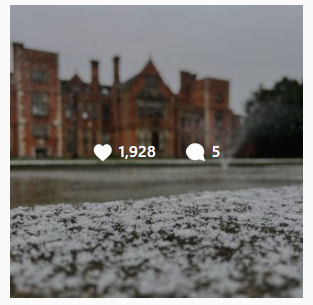
An Insta post showing 1928 Likes and 5 Comments

A screenshot of a hovered-over Insta post

The actual mechanics of finding out what your audience already likes are these: go to the parent org’s Insta account on a PC (or Mac) rather than a phone / tablet, and hover over their most recent 15 or so posts in turn, noting the number of Likes and Comments for each (as show here). Some will be way higher than the average, and some will be way lower - you don’t need to be a social media analytics guru to spot trends and see what content types engage the audience most. Even for well established accounts this is an invaluable technique and I’d recommend it to everyone.

3. You didn’t let us do FB and Twitter either - but now you do

I’m sure there are exceptions but it seems like almost all libraries go through the same journey. In the 2000s they asked to set up Facebook accounts and were told no; eventually FB became so prevalent the powers that be changed their minds.

Leading up to and moving into the 2010s, everyone asked to set up Twitter accounts - no, they were told; stick with FB. Then eventually, Twitter became so prevalent the powers that be changed their minds.

And now in the 2020s it’s happening with Insta (and may well happen with TikTok also) - the same process, whilst risk-averse management get comfortable with the idea that Instagram is a) legit and b) here to stay (more on which later). So there may be some mileage in saying ‘history shows we WILL eventually get onto this platform so why not start earlier, gaining more experience along the way and reaping the benefits sooner?’

4. Instagram is the most engaged with social media platform

We covered this in detail in the previous post, part 2 of this series. The short version is the amount of people who DO something in response to Instagram posts (as opposed to people who passively consume a post but don’t press the Like button, or comment / reply, or reshare, or any other kind of interaction) is much greater that the amount of people who do something in response to Twitter and FB posts. Not only that, but libraries are part of the most engaged-with industries on Insta. So when you post, people react: that’s more important than, for example, sheer numbers of followers. It’s the first step to converting this into ‘off-site’ actions, like using resources, visiting buildings, or signing up for classes etc.

5. Instagram is here to stay

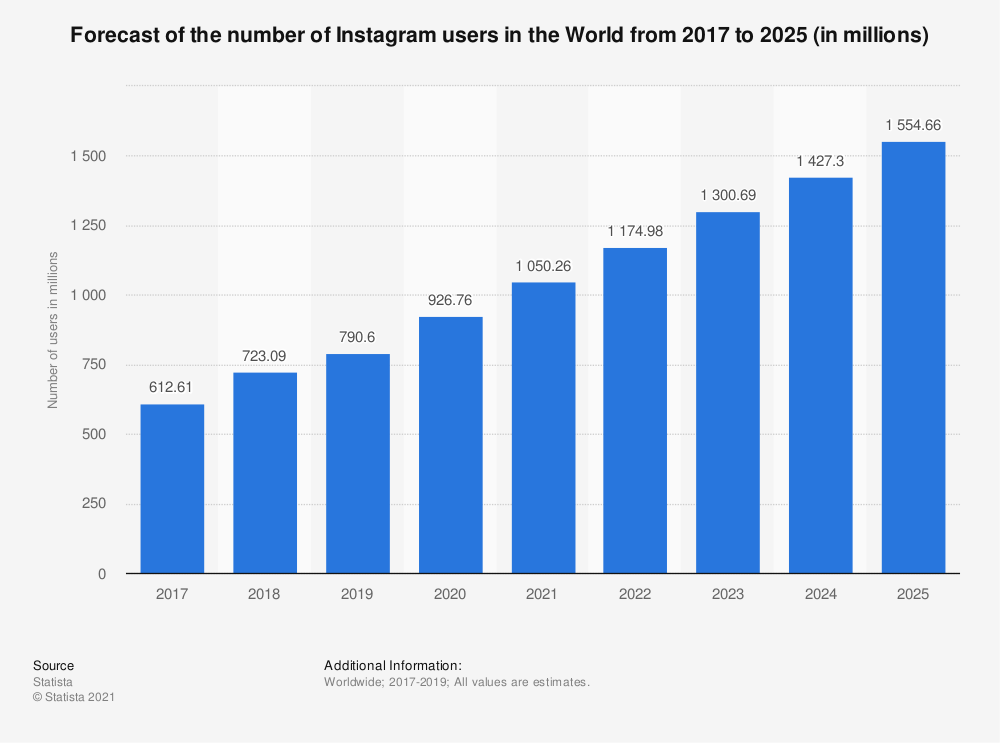
I personally wondered if Insta, with its meteoric rise, might burn brightly for a while and then fade. I was completely wrong. It is growing all the time in terms of sheer number of active users, and is predicted to continue to expand as this graph from Statista shows:

Graph shows 1,050 million Instagram users in 2021, rising to a projected 1,554 million in 2025

It’s also worth noting that the time spent on Insta each day by its users is also increasing according to TechJury, from 15 minutes per day at the start of 2019, to 30 minutes per day by midway through 2020.

All in all, then, Instagram seems extremely likely NOT to be one of those platforms where you invest a load of time and then see it all go to waste when the public moves on (like Snapchat was, for example).

6. Instagram is full of the younger demographic which is key to libraries

31% of Instagram users are aged 18-24, versus 17% for Twitter and 11% for FB - and in total over 70% on Instagram are 34 or under. There are a few library sectors not interesting in trying to get younger audiences to use their services, but not many: for academic libraries Insta is THE platform our students are all on, and for public libraries it’s populated by that key generation of potential library users who are younger than the overall average, but no longer children… Getting them to become life-long library users from the start of adulthood is a great goal, and Instagram can help with that.

7. You absolutely do not need to be a brilliant photographer or own a better camera than the one on your phone, to use Instagram successfully

For me Instagram has just the right amount of photo-manipulatability… Of course there are apps which allow you to do way more, but I don’t want EVERY option for editing; I just want some really useful ones. The combination of basic editing and flattering filters mean you can make the images you post on Insta look brilliant, even if you’re using a normal smartphone and don’t have a background in photography.

More importantly though, it is the subject of the image which matters most on Instagram, not the quality of the photograph. A brilliant picture of something prosaic will not get much engagement; a regular picture of something visually arresting will get Likes and Comments. (Obviously a brilliant photo of something really exciting is the best of both worlds, but the point is regular members of library staff can achieve success here without photography lessons and specialist equipment…)

8. You can now post from the desktop so staff don’t need a work account on their personal devices

Instagram was launched in October 2010. From then until the end of October 2021, you could not post on Instagram from a desktop: you had to use the app, unless you knew the hack.

That’s 11 long years for the idea to take hold that you need Instagram on your phone, and a lot of people don’t realise this is no longer the case (myself included until my colleague Megan told me about this the other day!). I’m delighted about this because I think some people, quite rightly, felt uncomfortable about having a work app on a personal device, so using Instagram instantly became something of a compromise, blurring those home-life / work-life boundaries. This is no longer the case: you can use it from instagram.com on your desktop, and keep those two worlds completely separate - potentially widening the pool of staff who feel happy to get involved with providing content for a library account.

9. IN THE CULTURAL SECTOR, INSTAGRAM USE IS HIGH

This means that there are LOADS of other libraries already there which we can learn from, and not only that but loads of museums, galleries, archives and other cultural sector organisations too. So many examples out there means it’s easier to find a model to suit the one your library would like to adopt, and means there are constant opportunities to learn, to develop new ideas, and potentially to develop partnerships too.

10. Last but definitely not least: we can improve the reputation of the library with Instagram

Instagram isn’t a hard marketing platform. (That’s part of what makes it fun to use.) What it does is keep the library in the mind of the user, showcase nice library locations, raise awareness of services and collections, and break down some barriers as to how people think about libraries in general. When used well, Insta will have a positive impact on the way your library is perceived, and help you deliver key messages. That’s argument enough for me on its own, but it’s not enough for everyone then there are nine other reasons to try above…

Good luck!