Tech Guide

Two great new sources of free-to-use stock photos


I got sent this guide to image sources, and it contained links to a couple of image sources I wasn't familiar with. They're both a little different to the sites I normally recommend, and I think they'll be very useful. I use stock images a lot, mostly in presentations but also in tweets, blogposts, other parts of this site, graphics and posters etc.

The downside with these particular sites, for me, is that it's hard to search them - they're both blogs rather than depository style sites like FreeImages.com. But actually this presents images, added on an on-going basis, in a new way (to me) which is potentially quite helpful.

The upsides are firstly you can do anything you like with them and you don't even have to attribute. The second updside is the standard of photography - and I've been looking for a free-to-use source vintage images for ages, and finally I've found one. Let's look at that one first.

New Old Stock

New Old Stock curates vintage photos 'free of known copyright restrictions' - this means you can use them for whatever purpose you like, however you want. Hey look, here's a library example!
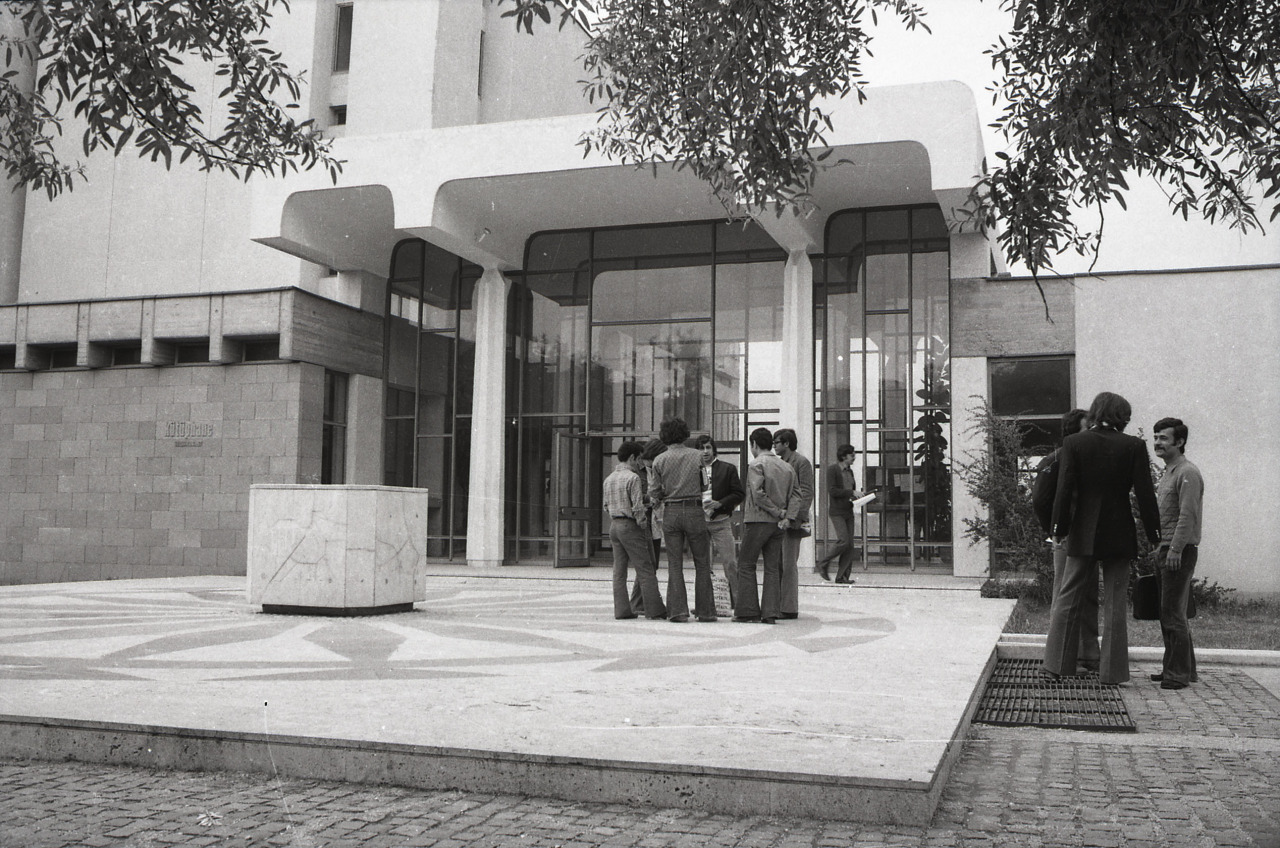
METU Library, via New Old Stock

METU Library, via New Old Stock

Some of the pics go WAY back, like this Egyptian example:

There's a huge amount to explore on New Old Stock, mostly B&W or sepia but with some early colour too, and if you're on Tumblr you can subscribe to get notified whenever they post more.

Unsplash

Unsplash adds 10 new images a day (you can subscribe to keep updated) and again, it has a 'do anything' licence. Specifically the site says:

All photos published on Unsplash are licensed under Creative Commons Zero which means you can copy, modify, distribute and use the photos for free, including commercial purposes, without asking permission from or providing attribution to the photographer or Unsplash.
— unsplash.com/license

... which is good to know!

There are real advantages to not having to attribute. Although I'll always do so in a presentation, when you're tweeting in image or designing a poster or web materials, it's nice not to have to take up space with a URL and author name. It's also important to be able to modify the images in any way you please - on Flickr, for example, the majority of the Creative Commons images aren't set to allow this, meaning you can't use them in presentations or posters, or indeed do anything expect display them as they are.

The images on Unsplash are just a cut above most free image sites - for example I've used pictures of both coffee and bridges in presentations before, but never as nice as these examples...

The header image for this post is also from Unsplash.

So take a look and see if these images will be useful either for you or your library comms.
Blogging to publicise research


Yesterday I gave a talk to some Music Technology students about blogging. They're using blogs as part of their course, and I wanted to convince them to get the most out of the opportunity, and carry on after their Masters is done, because I think blogging is a fantastic thing.

I wanted the tips below to apply to anyone in academia who blogs, but hopefully also to libraries and librarians and other non-profits who want to get more out of it too.

This isn't the exact presentation I gave to the students - I've annotated it so it makes sense without me talking over the top of it. It covers building a readership, embedding multimedia, using the analytics, and a couple of other things too.

In case you're interested, here's a link to the Twitter Tips and Tricks post, of which there's a screen-shot in the presentation above.

The Student Guide to Social Media is now fully reusable!


This actually happened at the end of last year but I didn't get around to blogging about it at the time. It's about the Student Guide to Social media - there's background info below and in a previous blogpost written when it first arrived.

Click this image to open the Student Guide to Social Media in a new window

Click this image to open the Student Guide to Social Media in a new window

It was always Creative Commons so anyone can use it, but now we've taken the ND (Non-Derivative) part off, so it's just CC-BY-NC. In other words you can take it and do whatever you want with it, including repurposing it, remixing it, taking only certain bits of it and not others, and generally reusing it in a flexible way.

It was made in Articulate, and the Articulate source file is available via JORUM. So if you want to use it to make something new, please go for it.

Whenever we talk about or use this in York the students are really responsive - it often gets rated as 'the most useful aspect' of infolit sessions. There's a growing awareness among undergraduates that social media can play a professional and academic role in their lives, but they often don't know where to start - so this overview is something they find helpful.

There's a bit more info about the Student Guide to Social Media on JISC's Digitial Student pages, too.

Two More Twitter Changes: Group DMs and In-Tweet Analytics

Following on from my post on the excellent new Twitter video, there's a couple of other things Twitter have introduced in the last couple of weeks.

The first is group Direct Messaging, where you can set up a group of people (up to 20) and privately message them collectively. The conversations can include pictures and be about specific tweets. This is potentially very useful for taking a problematic conversation or dispute out of the public eye but staying within the platform. From the point of view of libraries, that's great. From the point of view of librarianship, I'm not so sure.

The second feature is and tweet-by-tweet analytics within the mobile app. I mentioned in my previous post about Twitter's new Analytics how what the stats really show you is how few of your followers see each tweet (it's around 11%, and that's assuming it's not part of a conversation or at a weird time of day in which case it's much less, or if it's RT'd in which case it's a bit more). The ability to click on each tweet in the mobile and app and see the stats right away just reinforces this - here's a tweet linking to my last post, which got ReTweeted 21 times, and was still only seen by a number of people which amounts to just over half the total number of followers I have.

Twitter11.PNG

I'm not totally convinced the link clicks figure is accurate though - not just because it seems really low! But because it doesn't correspond with my website's own statistics or Google Analytics, which attributes a lot more click-throughs to this particular tweet.

But the total number of impressions I do trust. So what do we take from this as libraries? If something's important, you have to tweet it more than once! And it's also worth tweeting at the peak times for when your followers are online - this is usually around 11am and 3pm, but you can find out more specifically using Tweriod, which I'd recommend you do.

[Edit: Since I wrote that I checked Tweriod and it seems to have gone to a paid-only service, which is a real shame - FollowerWonk should tell you when your followers are most active though, so use that instead.)

Twitter Video is here! And it's going to be great for libraries


NB If you're reading this and can't find Twitter video on the app, don't panic, it's being rolled out across all accounts but not everyone has it yet!

I resolutely refuse to include things in my training just because they're fashionable, and for that reason I still don't talk about Vine in any of the sessions I do. I think Vine can be great (some of the 'Vine-magic' stuff is awesome), but I'm yet to see an absolutely essential use for Libraries or in HE, so it gets left out. [Edit: I've finally seen a good example of a Library Vine account! Check out Newcastle Lib's here.]

Part of the problem is that 6 seconds is just too short for the kinds of ideas I have of how to use what you might call 'social video', as opposed to the more permanent videos you find on Vimeo and YouTube. I feel like I've been waiting for something like Vine, but less trendy...

Happily last week Twitter launched an alternative to Vine (which it also owns, by the way) which I do think we can get some proper use out of. You can now take 30 second videos and upload them to Twitter, where they'll play within the tweet without people needing to leave the site or the app. (At the moment you can't use video already on your camera roll.) The videos can be combinations of several shorter clips like Vine, but it won't automatically loop, and it won't play without someone hitting the 'play' button.

If Vine is the short-attention-span but bang on-trend toddler of internet video, Twitter video is its more considered older sibling. Less cool, but maybe with more meaningful things to say.

Here's how it works (email subscribers, click the title of this post to be taken to the web version if the pictures aren't appearing):

Image taken from Twitter's blog - click to be taken through to the relevant post

Image taken from Twitter's blog - click to be taken through to the relevant post

Like Vine it records as long as you hold the button, and you can quickly stitch together multiple clips - as many as you can fit into 30 seconds, in fact.

Note the third screen-shot there - you can delete, and drag to re-arrange the order. So it may be worth recording the most important parts (the start and end) first so you know how much time you have left for the rest, then re-arrange the order - rather than meticulously creating something with 20 clips, only to not have enough time for the ending and having to redo the whole thing.

So how can libraries use it? Before we get onto specific themes, the most essential thing is to think mobile. The whole point of this feature is people watch short videos, where they are, within the app. Twitter offered promoted videos to paying sponsors before this was rolled out to all of us, and apparently 90% of them were watched on mobile devices. So, hit the ground running (1 second intro, max!); shoot from the chest up if you've got people in there so they can clearly be seen on a small screen; if you're speaking make sure you're close to your phone so it's not too quiet; if you use words make the font LARGE; and if possible make the video in such a way as to not need sound to make sense.

I'd love some more ideas in the comments, but here's a few video ideas to start things off:

Customer Service: answering questions with video. If you use Twitter for customer service or a channel for enquiries, you'll know that often when one person answers a question it's worth ensuring everyone can see the answer (hence the twitter dot!) as many will find it useful. There could be even more impact to answering a question with video. So for example, a basic query like 'how do I locate a DVD' gets much more interesting if the answer is a video...

Transient videos. By which I mean, something where a video is appropriate or useful or funny or tapping into some sort of meme, but which you don't neccessarily want a 'permanent record' of on your YouTube channel. It's not that Twitter videos aren't permanent of course - they are - but just that your YouTube vids form a sort of canon which needs to be left alone, so the most important videos don't drown under lesser inconsequential ones. But Twitter video would be a way of getting something out there - news about an event, say - without that feeling of permanence.

If you do need to keep them though, you have the option to embed like I did above, meaning a Twitter video can be seen by and used by those not on Twitter, via the Library website, blog, or LibGuides.

Lightning Tours. Everyone loves a virtual tour! And you need a longer video to tour an entire library, but what about a new building, or new collection? 30 seconds should be doable.

Quick-fire 'Screen Capture'. Narrate a video which tells your users how to do something useful  and then tweet it as a twitter video. So that opens up instant guides to using equipment, finding stuff, getting the most out of databases etc. Here's an example of that, explaining how to make Billboards in Photofunia. (You could even have a #30SecondsOn... series.)

Ask A Librarian. For the brave and camera-confident, get a Twitter Q&A going, and answer the best questions with a to-camera answer from someone who knows what they're talking about.

Previews. Preview a larger video (a full virtual tour, say, or an infolit guide) with a movie-style trailer on Twitter video.

That's all I can think of for now but people are bound to come up with more creative ideas, and I'd love to hear them.

There's more on Twitter Video here. How are you going to use Twitter video in your library?