How to

The art of empathetic library induction...

For as long as I can remember I’ve been in charge of my library’s Induction / Orientation process for new students, and it has evolved over the years into a fairly well oiled machine. We treat the whole thing as a marketing campaign, designed to maximise the chances of the students taking in our key messages.

Our Induction Group is full of brilliant staff from all different areas of the Library and Archives. There are specific aspects of what we do that I’d really recommend to all academic libraries, as they are sympathetic to students who are at constant risk of overwhelm as they enter the new University environment. Here are our key guiding principles for the art of empathetic library induction…

1 Don’t try to tell them everything

The most important part of an empathetic induction is putting the students’ needs above your own as a library - which is hard to do! But trying to get students to know all the things we need them to know simply does, not, work. There is too much information to ingest in too short a space of time.

I don’t like cliches about librarians but I’m willing to accept we do have a habit of trying to tell everyone, everything, all the time. When you’re brand new to a City, you’re sat next to someone you’re living with for the next year but only met for the first time last night, you’re finding out how your course works and where you need to go for lectures, and a whole new world is opening up, you just don’t have room for the different types of ebook availability.

So the key is to accept we can’t tell people everything, and move towards a model of BEGINNING a conversation. Tell the students the very essentials, and ensure the library is friendly enough that they come back and ask us more questions later. Induction is the start of the relationship, and not the whole thing.

2 Use week by week themes across multiple platforms

One of the easiest ways to make complicated information easier to digest is to cascade it across a period of time, in clear chunks - rather than using the same period of time to talk about everything all at once. Over the years at York we’ve got this down to a fine art, and we have five (or, arguably, six) themes that form the focus of our comms across the opening weeks of Semester:

  • Week 0 (Welcome week): general welcome info - the fundamentals.

  • Week 1: This is your space. A summary of the library buildings and how it all works.

  • Week 2: Our resources are easy to use. Book borrowing, eresources, subject support.

  • Week 3: We’ll help you develop next level skills - study skills, digital skills, academic skills.

  • Week 4: You’re part of a supportive community. All the ways you can get in touch, get help, support and guidance.

  • Week 5: Unlimited Possibilities. All the stuff you might not expect from the library if you’ve not been paying attention - digital labs, maker space, podcasting studio, archives, art collection and so on.

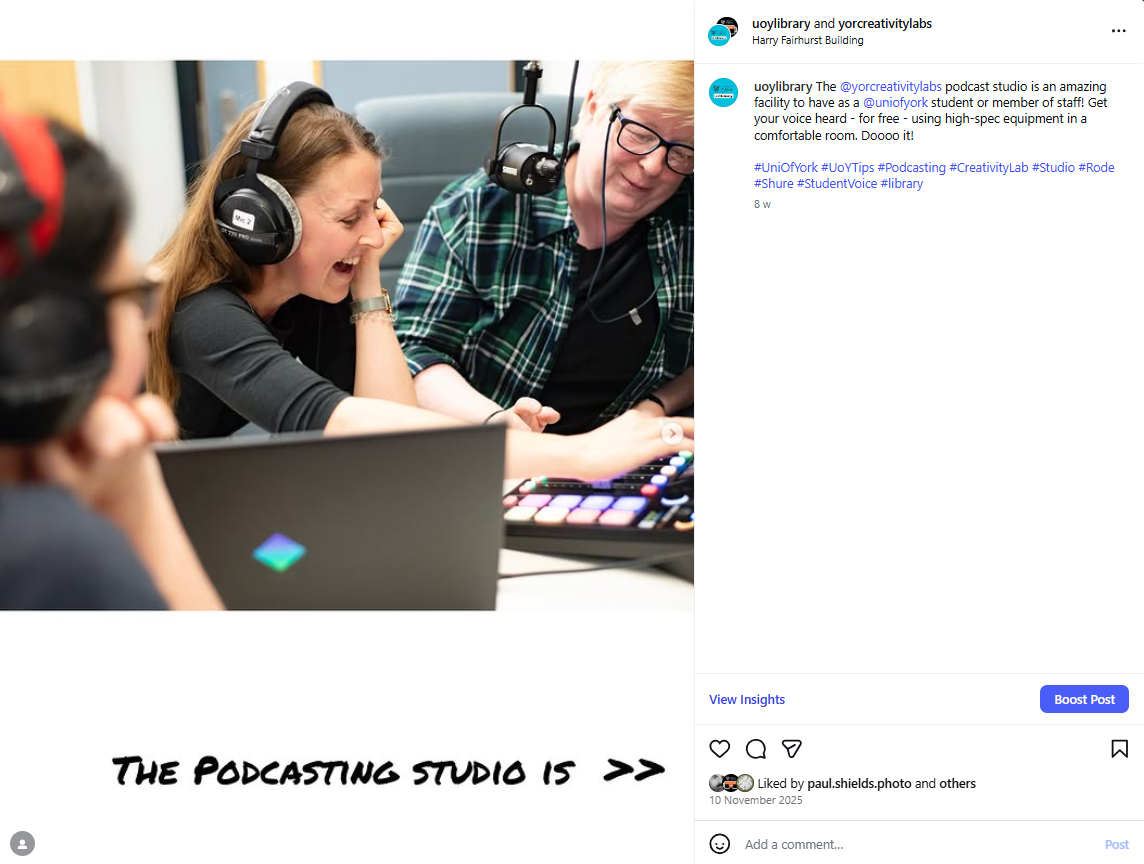
All these are summaries on our New Students Quick Start Guide, and then each week’s theme is distributed across various channels in various ways. These include vertical welcome screens in each library building, regular digital screens, a banner in YorSearch (the library catalogue), articles on the library website, and social media posts. Here’s an example of some of the Week 0 general welcome themed messages:
A catalogue banner and digital screens giving basic welcome info about the library

3 Speak to people face to face

We attend as many face-to-face induction sessions within Departments as possible, usually with someone from the Library Skills Team (which I co-manage) representing the entire Library. We have three versions of our Welcome Slides, aimed at Undergrads, Postgrads and Articulation Students respectively - it’s important not to take a one-size fits all approach, and we also have separate welcoming guidance for York Online students.

We also attend various welcome fairs, and run a welcome stand in the entrance of the library each lunchtime for Weeks 0 and 1 - this year we spoke to just under 1,000 students as part of this. All these interactions are essential in establishing the kind of relationships where students feel empowered to come back and ask more questions later.

4 Prioritise social media

Our social media numbers are exponentially higher than any other means we have of getting people information. Whilst the library website or the Subject Guides allow for nuance and depth, we know that not nearly as many people will see them than will see a successful Instagram post.

For us this year an important part of the general welcome was telling people that Careers & Placements had moved in to our building for 2026/27 - so I absolutely optimised the Instagram post about it (e.g. made it a carousel with music added, made it a collab, added text natively in Insta, etc etc) and thankfully it has now reached over 13,000 people (with over 30k views in total) - there’s simply nothing comparable available to me for getting the word out there.

5 Sneak in useful things for returning students

All of our info for new students is designed to be equally applicable to existing students who may have missed things first time around… We’re trying to give them fundamentals about how things work without making them feel silly for not already knowing - and in addition to this we produce specific guides for returning 2nd and 3rd years too.


By taking this joined up approach to induction we hope our students feel welcome above all. We hope they feel like the library is truly theirs. And we hope they know enough to get started, and to come and ask us when they need greater detail…
Upcoming social media workshops

I’ve got two workshops coming up for UKeIG in October and November.

I love doing these ones because they always turn into really interesting discussions in the Chat - there’s loads of practical advice, not just from me as a the trainer but from the other delegates too.

Purposeful Social Media

October 29th, 10am - 1pm, Zoom: booking and further info for purposeful social media on the CILIP website. This course is about social media with purpose: defining what you want to achieve, who you want to reach, and what you actually want to say. We'll move beyond broadcasting updates, to a building strategic, sustainable online presence that genuinely matters. Our time is limited, so how do we use it most effectively? 

YouTube, Instagram, TikTok and beyond: video marketing for libraries and cultural organisationS

November 4th, 10am - 1pm, zoom: booking for Video marketing via the CILIP website. Video is everywhere and becoming increasingly essential to successful library marketing. Instagram has shifted to become primarily a video-based platform, TikTok is huge, Facebook posts with videos get 50% more engagement than those without, and of course YouTube remains the third biggest site on the internet. This hands-on workshop aims to help delegates navigate this landscape, familiarising you with several styles of video, and giving you a chance to try out some useful tools.


As always I offer completely bespoke versions of all my workshops, tailored to your organisation - so if you’d like your own version of either of the above, please get in touch!


Posting carousels is like an Instagram cheat code in 2026

What is a Carousel on Instagram?

First things first: in Instagram terms a carousel is a single post containing multiple images or videos. They appear on the Grid, and you view the different images by swiping right.

Since mid-2023 you can add music to your carousel natively in Instagram, and doing so is absolutely crucial to success - it pushes the post into a different algorithm, ensuring it will be viewed much more widely than a single-image, music-free, regular Grid post.

Why are CaRousels so important?

The short answer is: reach.

Instagram’s algorithm has always prioritised video Reels over static images. For organisations, this often meant spending hours producing video content, or risking really low engagement and poor distribution with an image post. Reels are also less accessible than images, because there’s no built in alt-text feature for video on Instagram.

Over the last couple of years, there’s been a shift in the algorithm - Carousels now provide the reach and visibility of a Reel with the simplicity and accessibility of an image post. They bridge the gap. Your key messages can now reach massive audiences with less time, less production, and frankly fewer complications.

The proof is in the analytics

I run our institutional Instagram account - @UoYLibrary - which is a really significant part of our communication with students. I have a million and one other duties as Faculty Engagement Manager so as I noticed carousels getting more views I started to prioritise them over video content because they took so much less time to produce, not least because they can often be made using existing images I already have available to me, rather than needing to shoot new content.

The impact has been remarkable, The extraordinary thing is, even the less successful posts that don’t get the Likes and engagement I’m hoping for are getting consistently high reach and views. Meanwhile the successful ones are outstripping Reels - always the most popular format, historically - in all metrics.

2025 engagement

  • Saves: 3 of the top 5 most-saved posts were Carousels (including 1st)

  • Shares: 4 of the top 5 most-shared posts were Carousels (including 1st)

  • Likes: all 5 of the top 5 most-liked posts were Carousels

2025 reach and views

  • In 2024 our top five posts had a combined Reach of 32,095 people: only 1 of these was a Carousel

  • In 2025 our top five posts had a combined Reach of 40,228 people (a 25% increase) and 3 of them are Carousels

The most dramatic increase year on year is from Views - unsurprisingly, as if someone views three images as part of a Carousel, that counts as 3 views compared with just 1 for someone watching a Reel or viewing a single image post.

  • 2024: Our top 10 posts achieved a combined 70,099 views

  • 2025: Our top 10 posts achieved a combined 211,337 views

This represents a 201% year-on-year increase in total views. That top 10 breaks down as follows - several of these are collabs with other accounts, which is hugely important for Reach and Views too.

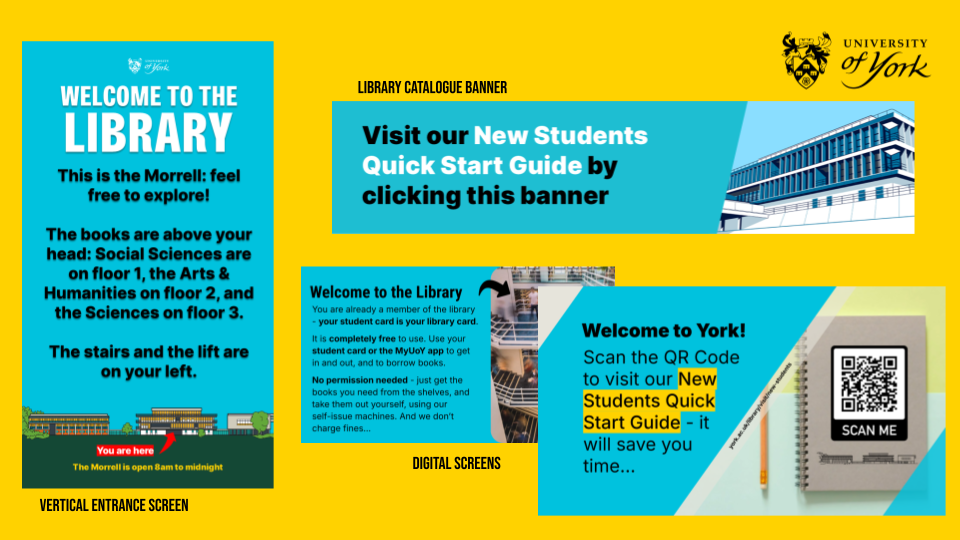
The top 10 posts on the UoYLibrary account in 2025, showing a Reach of 11,665 for the 10th, up to 41,753 for the 1st

@UoYLibrary’s 10 most viewed posts across 2025: screenshot from Meta Insights

A tale of two posts

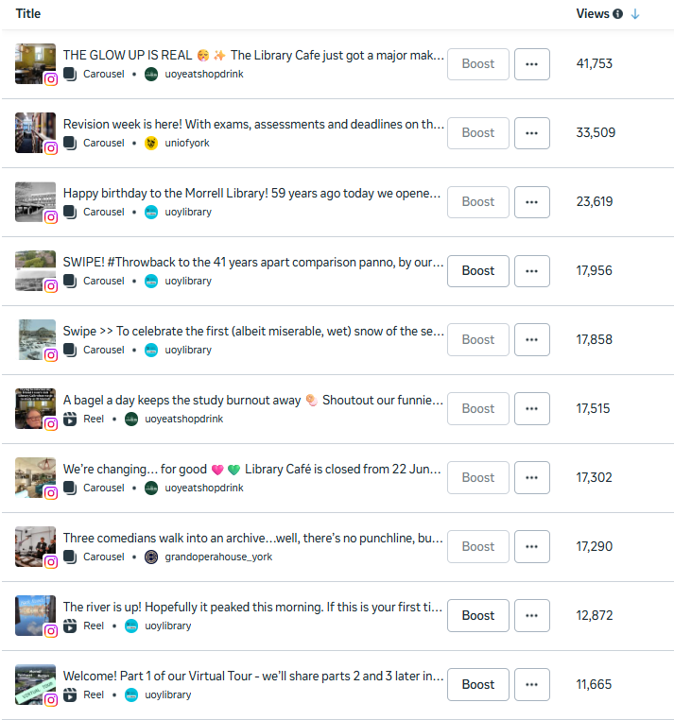
Our most successful post (that we originated, rather than were invited onto as a collaborator) in 2025 - by most metrics, albeit not Likes - was this Carousel to celebrate the library’s birthday. It reached over 9,000 people, was viewed over 23,000 times, and had over 750 Likes as well as large numbers of Saves, Shares, and new Follows.

Screenshot of Instagram post - the picture is of a brutalist library, taken in the 1960s, with 'the Morrell is 59 years old today!' written above it

The most viewed post originated by @UoYLibrary in 2025

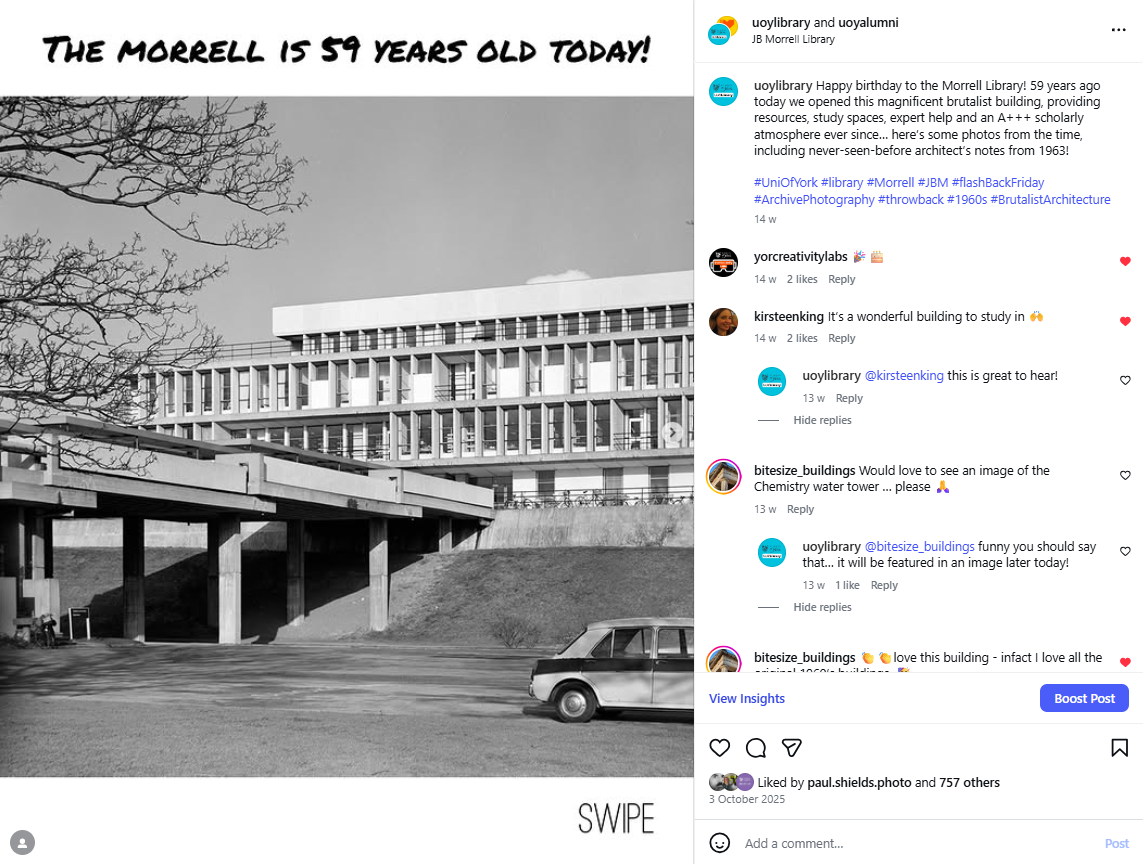
For me though, a better example of the power of the Carousel is our least successful post of 2025. In fact in terms of engagement, it is, I think, the least successful post I personally have put on the library Instagram account in its entire history (full disclosure I looked back through six years’ worth of posts before giving up)… It got 17 Likes.

Screenshot from Instagram - the post shows three people in a podcasting studio with caption below 'the podcasting studio is >>'

@UoYLibrary’s least Liked post of 2025

Despite this total failure on my part to pitch the Podcasting Studio in such a way as to get Likes (previously when I’ve done a Reel on this it’s had much more Likes, and the TikTok version did really well too - so it’s the framing, rather than the subject matter, that’s the issue with the post above), the Carousel of it all meant it has still reached nearly 900 people and had nearly 4.5k views.

To put that in context, the post reached more people (and got 106% more views) in a week than the podcasting studio webpage did in the whole of 2025 - and that includes a spike in the webpage views caused by the Instagram post… There’s nothing wrong with the webpage - it’s just that our target audience don’t really web-search, but they scroll-search social media all day. So all in all: the habits of undergraduates x the reach of the Carousel = even an unsuccessful Insta post getting key messages out really well compared with other mediums.

Get posting

I’ll write another post soon about what works and doesn’t work with Carousels but for now I hope you’re convinced that, going into 2026 if you’re running an organisational account it’s time to plan some Carousels. In fact I wouldn’t post any individual images this year - why throttle your own reach, when a Carousel would go so much further? Get your message out to the widest audience possible, and take advantage of the cheat code while it lasts!

How many hashtags is too many hashtags?

I just ran a social media workshop in which one of the brilliant attendees posed this age old question:

“We’ve been having a huge debate about using hashtags. Are they still a thing? Should we be using them?”
— Catarina

As I answered I realised I have a pretty definitive idea about not just whether we should be using them - yes - but also how many we should be using, which varies wildly by platform. So if you do social media for your organisation or otherwise create content, and you’ve ever asked yourself how many hashtags is too many hashtags, read on!

Three disclaimers before we start:

  1. Hashtags are the cherry, not the cake. The content of your post is waaaay more important than the tags - but using hashtags well WILL improve your posts’ discoverability.

  2. It’s more important to use the right hashtags, than the right number of hashtags. What is going to help people discover your post? What do people who need your content search for? Hint: adding a universally used hashtag (like #love for example) simply won’t do anything positive. If everyone uses the same hashtag, your post joins an almost infinitely long queue of other posts. Aim for the sweet spot between high volume hashtags that everyone uses, and low volume hashtags that no one will ever search for. For the librarians and archivist out there: hashtags are basically metadata!

  3. The info below is really just my views, as of late May 2025, built on my own experience and reading others’ research, rather than the ‘right’ answer… Use this as a jumping off point and conduct your own experiments!

How many hashtags should I use on TikTok?

Use 3-5 hashtags on TikTok. Recently TikTok started limiting users to five hashtags, so this one is easy. Ignore the super-cool TikTok accounts that use no hashtags at all, or the desperate accounts that use generic like #fyp #ForYouPage and #viral. 3 to 5 hashtags on TikTok will help the algorithm push your content in relevant directions -any more and it will basically get confused… Remember, the majority of TikTok posts are seen by people who DON’T follow the accounts posting them - so use every advantage available to you to get eyes on your videos.

How many hashtags should I use on Insta?

Use 5 hashtags on Instagram. I’ve had to update this one since I originally wrote this post… I used to recommend a higher number, because of a study which looked at 38 million posts and found that 11 was the optimum number of hashtags. However Instagram has now imposed a limit of five per post, so that’s what we all have to work with. Finally - and this is really annoying but everything I’ve read confirms it’s true - don’t use the same ones for each post. You need to mix them up a little, and avoid two posts in a row with the same tags. Gah.

How many hashtags should I use on Facebook?

Use 0 - 2 hashtags on Facebook. Hashtags are less important on FB than on TikTok or Insta, but they can help your post show up in searches. Don’t crow-bar them in, but take opportunities to use them organically in your posts.

How many hashtags should I use on Bluesky / Threads?

Use 0-2 hashtags on Bluesky, and Threads. You don’t have to use any at all, of course. The way hashtags are used on these platforms is more like a form of curation - for clicking on and finding related posts, rather than particularly for search. On Bluesky using certain hashtags will also push your post into certain custom feeds - be careful not to abuse this by over-using them!

How many hashtags should I use on YouTube?

Use 3-5 hashtags on YouTube. YouTube is interesting in that it works completely differently to all other platforms listed here: for a start, it has a seperate ‘tags’ section when you upload. Here you can put all the tags you want to help with discoverability, and they won’t be readable by other people - they just help with searching. So use this freely and fill it right up. Secondly, you can put hashtags in the description - or you can put them in the title. With YouTube shorts in particular, putting a hashtag in the title - IF it’s something people will likely be searching for - can be really beneficial. Thirdly, if you use too many hashtags in the description or title, YouTube literally ignores them completely. So don’t do lots! One or two max in the title, and a couple more in the description, should do it.

How many hashtags should I use on LinkedIn?

Use 1-4 hashtags on LinkedIn. A haphazard approach doesn’t work well here: use one or two tags which are specifically relevant to your industry and your post (and avoid the generic, overused cringey ones like #productivity…).

How many hashtags should I use on X?

It doesn’t matter. Just get off it. You’ll feel so much better.

7 Universal Tips for Better Videos on Any Platform

I organised a video creating / editing workshop for my team this week, delivered by my excellent colleagues Sam Hazeldine and Siobhan Dunlop who run sessions in our Creativity Lab. One of the standout pieces of advice they shared was this: if your subject is moving, keep the camera still. If your subject is stationary, move the camera. 

I realise while I tend to follow this principle instinctively, I’d never articulated it or heard it expressed so clearly before—and it’s brilliant advice. Simple, but incredibly effective. They also shared a few other tips I often include in my own workshops on video marketing, which got me thinking: are there universal tips for shooting and editing videos, regardless of format or platform? Creating a YouTube video is vastly different from making vertical content for Instagram or TikTok, yet some principles apply across the board. Here’s a brief list of those tips—feel free to add your own in the comments.

Filming tips

You don't need incredible gear, but you do need good sound

Whatever phone you’ve got is good enough quality to shoot good video. You don’t need specialist equipment. But the most common reason videos don’t work is poor sound - in short if you don’t have an external microphone, make sure whoever is speaking is close to the phone, or the audio will simply be too quiet. As a bonus, close-shot interviews or talking heads are a good thing anyway, because you can clearly see the subject when you’re watching it on a phone - and the vast majority of your views will be on mobile devices, so do keep that in mind while shooting.

If you’re recording a voice-over in your own kitchen and it sounds echoey, put a duvet over your head. You can also add compression in Audacity (it’s free, open-source and easy to use) which helps by reducing the distance between your quietest and loudest words. If you work in a large organisation, check if your AV department has radio mics you can borrow for recording multiple speakers or capturing voices from farther away.

Record your audio first, and match the video to that 

If you’re making a video with a voice-over, trust me; it’s easier this way around. It’s not really acceptable to speak really fast to fit more in, or add superfluous narration to slow things down, to match the visuals - record the audio first (again I like to use Audacity) and then fit the video to that.

always Shoot more video than you need 

This links directly to the above. Not having enough video to fit the audio is a nightmare - you end up using slow-motion or repeating shots, which reduces the impact of the video. Recording a few extra seconds before and after each scene, and filming additional “b-roll” (background footage of the setting or activity) will allow you to fill any gaps later. Future-you will thank you during the editing process.

Leave a pause at the beginning and end of everything you say 

This is one of the best pieces of advice Sam and Siobhan shared, and yet it’s something I still forget to do. Adding a pause at the start and end of a clip prevents abrupt transitions: while a sense of urgency is good, pauses allow viewers to process what they’ve just watched. This is especially important if you (or your subject) need to retake a line—leave a pause before resuming. Without it, you’ll end up editing around moments where someone launches into their line right after laughing or apologising for a mistake. It causes such a headache. And talking of the edit…

Editing tips

It's easier to edit a landscape video to fit portrait, than the other way around 

The subject of whether to make videos horizontal (YouTube, Facebook) or vertical (Insta, TikTok) is too complicated to explore in detail in this post, but suffice to say sometimes you’ll want a multipurpose video that can be edited and posted to both old-school and new-school video platforms.

If you need a multipurpose video, always shoot landscape. Cropping landscape footage to portrait is manageable as long as the subject stays centered. However, editing a vertical video to work in landscape is next to impossible.

Here’s an example of a video I shot multipurpose: the YouTube version is the ‘official’ virtual tour we have embedded on our website:

…but of course Instagram is where the real reach is, so here’s the vertical version which has 14k more views:

Slow that text down!

Editing video is often a long and finicky process, and you end up seeing your film so many times you become too close to it. As the editor, you’ll naturally read on-screen text faster than your audience, who are seeing it for the first time. Let text linger longer than you think is necessary. This gives viewers enough time to read and process it.

If possible, show your video to someone else before posting—they don’t need to be a video expert to provide helpful feedback on pacing, text timing, and audio clarity.

Don't use 99% of the available tools in a given video editor (or: simple is better) 

Almost every great video is simple. Video editors allow you to do all kinds of fancy stuff, and it is essential you resist temptation here… Those transitions between sections where the picture falls over backwards or rotates or folds up and flys off? They have novelty value, but NO OTHER VALUE! Your audience are not helped by these gimmicks.

In fact, most of the tools and techniques available in video editors shouldn't be used in a typical video. They just get in the way, and the clutter detracts from the story and the message. If you’re going to use animations or visual effects, do so with intent - in other words because they serve the intended audience.


Finally, remember that video isn’t always the right medium! This is easy to forget because we live in the age of video content, but sometimes a piece of explanatory text on a website, or a caption on an Insta photo, can be more useful for users - as always with any kind of marketing, put yourself in your users’ shoes and ask what you’d find easiest…

If you’d like to book a video marketing course for your organisation, get in touch!