
Professional Development

So you want to be a library freelancer?

10 years ago today I did my first ever freelance work. It was for the Latvian Ministry of Culture (of all people!) and within 12 months I’d run workshops for the Bodleian, then UKeIG, then the British Library, all of whom I still run workshops for a decade later, and I was off. I went down to 90% in my day-job and started doing a day of freelancing a fortnight, and I’ve now done over 270 workshops in 16 countries for 78 different organisations.

I absolutely love it. A decade of doing it is as good an excuse as any to write about it so for anyone who’s interested here’s what I’ve learned along the way.

The freelance work benefits the day-job, and having a day job benefits the freelance work

I am constantly bringing to my day job things I’ve learned doing freelance work. The analytics apps my library uses for social media, the PowerPoint techniques used to create our Induction slide decks, the campaign structure we use for our marketing - all of these were researched / developed for training and then adapted for my work place. There’s no better way to keep on top of new developments in your field than to have to know enough about them to be able to train others! So for example, when it comes time to make a video for the library there’s several apps or programmes I know how to use - because in order to include something in a workshop I always have to have used properly it myself.

It works both ways though; the day job feeds into the workshops. It grounds me in the reality of working in libraries with all the constraints that involves. Feedback I get a lot after workshops is ‘it’s so nice to have someone talk about marketing who actually works in our industry so knows what we can and can’t do’. Working in a library 4.5 days a week is extremely useful for the training that happens in the other half day.

The creation-to-delivery ratio is bonkers and not in a good way

I have a selection of workshop outlines which I adapt for each session. There’s three broad categories - strategic marketing, social media, and presentation skills - with variations. Each of those took hours and hours and HOURS to create, and then I usually spend an hour or two tweaking content and making improvements for each workshop.

Sometimes people will ask me to run training on a topic I’ve not done before, and I almost always say no - because to make 3 hours’ of content for a half-day workshop takes at least 12 hours. Planning structure, outcomes, creating slides, planning tasks and activities, writing the booklet - there’s at least a 4:1 ratio of creation to delivery. So if you take on a workshop or training gig, make sure you book in a LOT of prep time if it’s something you’ve not done a version of before.

That said, I always tweak the sessions. I’ve almost never delivered the same set of slides twice - there are always new ideas or improvements to incorporate. Sometimes I get people coming - deliberately! - to versions of sessions they’ve attended with me before, and in those cases I’m always relieved that there’ll be new content for them…

It’s lovely to build relationships over many years. One of the things I’m most proud of is that 39 of the organisations I’ve worked with have invited me back!

The orgs I've delivered most sessions for

My relationships with the Bodleian, LIEM, the British Library, NEFLIN, PiCS and UKeIG go back years and years now, I really value that. And speaking of relationships…

The best thing about librarianship is librarians

Libraries are great, but the people who work in them are better… The community is certainly not without its issues, but in general I find it to be supportive and great at sharing. Especially in the age of zoom workshops, one of the things I love is how much knowledge the participants share with each other - everyone, including me, learns from everyone else.

One of the very best things about freelance work has been the opportunity to travel. Four of the countries below I have only worked in virtually, but the rest I’ve been fortunate enough to visit for work, and librarians are fantastic the world over.

Workshops by audience location (excluding England)

(Includes online)

Flexibility and interaction are everything

Interaction is what makes workshops feel alive and exciting. An audience full of questions and comments is just the greatest thing, and as a trainer I thrive off the energy that comes with it - and it’s lovely to know the workshop is really covering everyone’s specific needs because we’re discussing them. Sometimes groups really have to be convinced that you want interactivity, so re-emphasise it a few times both out loud and on the screen with specific prompts. I’ve done 144 in-person sessions and 128 online - the Chat is absolutely brilliant in online sessions, and I really enjoy getting to hear even more from delegates - tips, advice, examples, questions - than I do face-to-face.

Flexibility is absolutely essential for long training sessions. A session running from 10am - 4:30pm has so much potential to be elastic in terms of timings, so it’s worth being ready to change things on the fly. I usually put in more slides than I think I’ll need, then go into the slide-deck and hide material as I go along depending on how much discussion there is and what people want to focus on - then share the fuller version of the slides with delegates afterwards so they can still see the extra content if they’re interested.

You do not have to do things the way you’ve seen them done before

I can’t stress enough how it’s worth starting with a completely clean slate when building a training session. You don’t need to use post-its, or break-out rooms, or group discussion and a nominated person feeding back, just because they all get used a lot. You can, of course! But choose each activity because it best suits the work you’re doing and the delegates in that moment, rather than because it’s the sort of thing that normally happens...

I’m genuinely honoured to have worked with all these organisations below. If you’ve ever come along to a workshop thank you so much for attending, and if you asked questions or made comments thank you for that (and if you didn’t that’s fine too!), and I really hope you found it useful. I’m looking forward to seeing what the next decade brings.


If you’ve made it this far, thanks for reading! And by the way, the Instagram series that was previously running on this blog in 2022 WILL return next time I post - we’ll be talking about Stories: what they are, why they’re important, and ideas for how to use them well…

Instagram for Libraries

If you do one thing differently with your library social media this year, what should it be?

The local knowledge you have of your library and your community always beats generic advice online - this article included - so if you already know what you want to focus on, I’m not telling you what you should do instead. Go with your instincts. But if you’re wondering about where to put your energy over the next twelve months, I’d suggest Instagram.

Twitter / X remains pretty vital to libraries, but for how long? It seems to be imploding, and people are leaving it in droves. Plus, many libraries have been developing their twitter accounts for years, whereas Instagram is still (relatively) new and can often benefit from some strategic attention.

Facebook remains essential for most public libraries, and continues to offer diminishing returns for the other sectors. I recently ran a marketing workshop for an academic library who’d lost their Facebook account through no fault of their own and were planning on starting again; don’t bother, I told them. I’d love to be free of Facebook - it’s such a problematic site and its increasingly difficult for libraries to get enough return on the time they invest in it.

Another reason not to worry too much about Facebook is it frees up time to spend on social media platforms with more impact. We only have so much time and we shouldn’t spread ourselves too thin; it’s better to do a small number of things well than be everywhere but not have time to do anything with full commitment. Which is also the reason I’m not recommending a focus on TikTok. It is the coming platform for sure: as of September 2021 it reached 1 billion users (becoming the fastest social network to do so, beating Instagram by 2.5 years) and a scarcely believable 167 million videos are watched per minute on the platform. But TikTok is something which takes a lot of time and energy, so perhaps it’s one to focus on if you’re absolutely nailing all your other social media profiles already… My biggest issue with it from a library point of view is that I can’t see a way of using it really well without the need for someone to appear on camera. If you look at @ToonLibraries (my favourite library TikTok and the best example I’ve found on how to do it well) it’s clearly the brainchild of a particular librarian with a real affinity for the platform - she’s in most videos because TikTok is a very personal medium, unlike Instagram or YouTube which can be both personal and impersonal. It requires a physical presence on screen. I’m not prepared to do that, nor ask anyone else to, so for that reason I’ve registered my library’s username so no one else can claim it in the meantime, while I wait for a suitable use case to present itself!

So to Instagram, then. It’s the third most popular social network (behind Facebook and, if you count it as social media, YouTube) with 1.4 billion active users. It is full of creative people. It is photo-and-video led but doesn’t JUST contain images. And it is, fundamentally, a nice place to market your library! It’s fun. The community are responsive. Instagram is an ever-growing site and very popular with younger people. For public and academic libraries it is essential - for school libraries it can be brilliant. For special libraries your mileage may vary.

So how do you go about using Instagram as a library, or indeed any cultural organisation? I’m starting the year with a series of posts about this: find the Instahacks mini series here.

Firstly how to make the case for creating a library profile if you don’t have one already, then getting started and how it all works, before moving onto the specifics: how to use Stories, and how to use Reels.

In the meantime you can see if I’m running any social media workshops online, or get in touch to book some training / a workshop for your organisation.

Risks and Rough Edges: Building Genuine Relationships Through Library Social Media

Here we are with another regular blog-post, following on from the last one a mere [checks notes] 418 days ago!

I was recently invited by Royal Holloway to present at an event they were organising on academic library social media. RH themselves were also presenting, as were representatives from MMU and Liverpool Uni Libraries. The other presentations were all great (see below) and I learned a lot.

My presentation was about the work we do at University of York Library, and in particular how we’ve seen a monumental spike in social media engagement over the last 18 months or so. The slides are here.

The whole thing was recorded on Zoom so if you’d rather you can see and hear the slides here:

The video above starts from my talk, but I’d really recommend checking out the Nathalie Rees’s talk on MMU, Patrick Walker and our host Greg Leurs’s talk on Royal Holloway, and Amy Lewin’s talk on Liverpool University too.

It was great to hear talks from four different libraries with four varying approaches (I felt we at York had the most in common with Liverpool but everyone came at it slightly differently. There were so many conferences and events centering on social media a few years ago but you don’t get so many now - it’s still a really key issue though!

Thanks again to Greg for inviting me to present.

Tweeting for libraries: a handful of useful tools and examples

I ran a webinar on building engagement on Twitter during this strange lockdown times we live in, for the Living Knowledge Network run by the BL.

I ended up finding some useful tools and examples I’d not seen before as part of the research for it, so I thought I’d share those (and some classics) here, if you’re interested…

Image Resizing

Tweeting images is good: 80% of social media use happens on mobile devices, people scroll at speed - images help slow them down and engage with your stuff. (That said, I see some libraries including an image with literally every tweet. Conversely I actually wouldn’t advise this as it reduces the impact of all of them. Think of images as punctuation to your timeline, rather than the words.) If you make images the right size, people can see all of the image in your tweet, without needing to click on it to expand - which many people won’t do, so it’s good to make the most impact from the image without the need for a click.

The short version of resizing is, make your images 16:9. These are the right proportions to display correctly in a tweet. You can achieve this by using a PowerPoint slide as a template - these are 16:9 in default (since Office 2013 anyway) and you can Save As and choose .png rather than .pptx to save a slide as an image. Or, take an existing image and use photoresizer.com to get it exactly right for Twitter.

Going a step further with this, check out @nanobop’s really handy guide to posting multiple images in the same tweet. The first one in the thread below we’ve already covered, but click on it and read the follow-ups for guides to posting, 2, 3, and 4 pics at once, and the ‘open for a surprise!’ technique.

Twitter Moments

Sometimes you do something on Twitter and it goes well and you want to capture that success. Storify and a number of other tools have been great for that in the past, but are no longer available.

Step forward Twitter’s own Moments feature. It allows you to pull together the tweets of your choice into a little narrative, with an explanatory note at the top - then share it with whoever you like. Here’s a Moment I put together for my own place of work about a new space we’d launched: I used it to share all the positive feedback with non-twitter-using colleagues (and to make the success story easy to come back to later when I do an annual social media report) - you can view this Moment here.

Another example of using Moments is below - this time just to collate our own tweets and easily share them, rather than documenting feedback. We asked our users to draw our buildings, a challenge they took on so well I ended up using the fabulous Photofunia to put their images into gallery settings… This went down really well, I’d recommend trying it with your own library.

View this moment here or by clicking the image below.

A @UoYLibrary Twitter moment

A @UoYLibrary Twitter moment

Battles and other threads

There are millions upon millions of tweets every day (there’s more than 350,000 every minute…) so it’s easy for your own attempts at engagement to get lost amid the noise. One way to help them stand out is to build something more tangible and substantial than separate tweets.

Sometimes friendly institutions ‘war’ with each other on twitter - this epic #AskACurator battle between the Science Museum and the Natural History Museum drew so many eyes to it that it ended up in the papers, as did this more recent ‘creepiest object’ thread. (There are merpeople in both which are just off-the-charts horrend.) In the Library world, the ongoing good-matured spat between the Orkney and Shetland libraries twitter accounts is excellent and benefits both parties.

Threads are just a series of related tweets. If you reply to your own tweet they are connected; if someone finds one they can find the rest. You can build a thread in three main ways - all in one go BEFORE you tweet any of it (by clicking the little + symbol to add another tweet as many times as you need before you click ‘Tweet all’), in real-time where you just add your tweets as you go along - this is good for incorporating feedback and questions from your followers - and over a series of days, weeks, or even years. This example from the Glasgow Women’s Library is a thread tweeted over a month - every day more and more people found out about it and got involved, and because it was threaded rather than discrete tweets, they could find all the previous tweets very easily, whatever point they came in at…

Happy tweeting everyone.


By the way the header image of the balanced stones (from Pexels) was in reference to a bit about balance which I took out of the post above, but I really liked the picture so I left it in, if you’re wondering what that was all about.

8 tips for teaching library sessions online

We’ll all be teaching infolit online for the foreseeable future (I hope) and it is, as anyone who’s done much of it will tell you, a very different experience to being in a room with people.

I do a lot of training online already for overseas audiences, so I have some familiarity with this. For what it’s worth, here are some tips for retooling your sessions to work in a webinar type environment.

  1. Plan your session so your audience switches frequently between listening and doing

    I don’t know how you currently do your workshops, obviously, but if for example you do a 20 minute intro, then give people 20 minutes to do a task or two, then 10 minutes summing up at the end, you may find it worthwhile to rejig this a bit.

    In the online environment where everyone is learning on screen, too much of anything for too long is a barrier to engagement. Long talky bits are really hard to pull off, and long activities don’t often work either. And indeed, long sessions overall - if you had a 2 hour class booked, make it 1.5 hours max for screen-learning.

    In my experience, relatively short bursts of talking interspersed with relatively short bursts of activity works best. So take a big exercise and split it into two; introduce part one, let them try it, introduce part two, let them try that. And so on. Short, sharp chunks. (Can you have sharp chunks? Shards, maybe.)

  2. Mute participants (apart from specific times for questions)

    I always, always have participants muted as they enter the online space. If everyone’s mic is live, it quickly becomes a cacophony of noise that makes it impossible for anyone to really concentrate. (Honestly just one person having a chat with someone in the same room is enough to derail things.)

    I encourage questions at any time via the Chat (more on which below) rather than audio - however sometimes it can be beneficial for people to ask questions out loud rather than type them. If you want to do that, have a clearly designated time in the session when this will be possible, and signpost it ahead of time. “On 30 minutes we’ll pause, and anyone who wants to unmute and ask a question can do so then.” Then the conversation happens, everyone mutes again and you carry on from there.

    If you do this it’s important to wear headphones, otherwise the audience’s questions come out of your PC speakers, into your mic, and back out of the speakers again - this causes all sorts of problems and is definitely best avoided…

  3. Consider using your webcam for the intro, then turning it off

    Assuming you have a webcam and video is an option, there’s a balance to be struck there too. Webcam-on for the whole session is, in my experience, not conducive to good teaching. You instinctively present to the camera, and this means you’re worrying about that side of things rather than your slides and the Chat. Especially if you’ve not done too much online teaching before, I’d keep things as simple as possible because there are so many more things to juggle than in an online session. You can choose to not use the webcam at all (that’s fine!), or use it for the intro and then say ‘now we’re moving into the session and using the slides, I’m going to turn off the webcam so you can see my screen better’.

    This is because part of each slide is blocked by your own face with the webcam. I have done a workshop where for specific reasons the whole thing was camera-on, and I found it useful to work out exactly how big the camera-window would be and create a Shape in PowerPoint that was the exact dimensions. I then put this on every slide and made sure no content was going in that part, so nothing would be obscured by the window later (which I positioned over the Shape).

  4. The Chat function is absolutely key

    If you’re using webinar software then Chat will be a way your audience can ask you, and each other, questions. Confusingly there is also a Questions function in things like GoTo Meeting - and it’s really important to shepherd people toward Chat rather than Questions. Questions are only seen by you, but Chat is seen by all participants. Obviously if someone had a sensitive query, the DM-style Question is the way to go - but for everything else, you want to encourage active participation as much as possible. Often the difference between good online training and great online training is the Chat - the more people talk to each other and to you, the more than barriers of it being online fade away and the more useful the session becomes.

    Whether you’re using Hangouts style software or webinar software or Google Q&A, it goes without saying you need to keep the Chat where you can see it at all times. You can have particular periods of the session when you dip into it and respond to what has been asked, but seeing the questions as they come in is vital for engaging the audience. Obviously if you have a second screen this helps a lot, but if you don’t have that option it’s still worth making sure the Chat is visible to you always.

    I tell people about it at the start, and I remind them about two minutes later - I tell them about it again and again because sometimes people need encouragement to use it, but once they do everyone tends to join in. Teaching is so much richer when you respond to the audience’s specific needs, so it has to be a priority to make sure these needs are expressed…

  5. Get used to not speaking

    What separates good online teaching from boring webinars is interactivity. The Chat is key to this as discussed, but so is getting people to DO things and - trust me on this - it feels really, really, weird to give people time to do activities and exercises while you sit there in silence. But it’s better to have a couple of 5 or 10 minute activities where your audience are genuinely given time to try things out and then report back in the Chat.

    I find this really tricky because you become hyper-aware of the dead air. You’re not wandering around checking what people are doing, you can’t see them working or hear them chatting to each other. You feel faintly absurd, sitting there in front of your PC and hoping people are using the time you’ve given them to do the thing you’ve asked them to do. But it’s essential - it stops it being a classic ‘boring webinar’, one-way traffic delivered as a lecture on screen which, even if you’re great at public speaking, is not enough to truly engage most audiences.

    I find the not-speaking part so hard that I set a stop-watch for it every time. If I’ve told the group they have 10 minutes, I’ll start a stop watch and not stop them until 10 minutes is up. If I don’t take this measure, I inevitably get angsty 6 minutes in and then move things on prematurely…

    I always mute my mic for these parts - no one wants to hear the click of your keyboard etc - but check in on the mic a couple of times during the period to say ‘don’t forget if you have any questions or something isn’t working as you’d expect, ask me in the chat’. When people ask a good question I’ll come back on the mic and pick it up with the whole group, just as I would with a face-to-face session.

  6. You may wish to stand up…

    Teaching needs energy, and sometimes it’s hard to bring energy when you’re sitting down! If your mic and other equipment allows it and you’re comfortable doing so, standing up to deliver your session just as you would in a seminar room can really help. Without hand gestures and facial expressions it’s already hard to get your point across dynamically, so your delivery counts for a lot.

    Something solo radio DJs apparently do a lot is put something opposite them to stand-in for the audience - a cuddly toy or, in one studio I saw, a Policeman’s helmet - and they talk to THAT. Rather than talking just generally into the ether, addressing something specific (even something faintly ridiculous) will focus your delivery and make it more human. So grab some sort of mascot and stick it above your monitor…

  7. If you can do online teaching in pairs, take that option

    Managing an online session is quite stressful - if anyone has technical problems you really can’t help them and teach at the same time. So pairing up, with one person teaching and another facilitating, is well worth doing if you can. The Facilitator can be on hand to help participants, both with the logistics of the online session and with the exercises themselves - they can also message the presenter to flag up a Chat question if they miss it. Working as a team in this way allows you to teach better because you’re not splitting your focus. 

  8. Good slides matter more than ever

    If you’ve read this blog before you’ll know I think good slides are important. In online teaching they’re even more so, because they’re the only thing your audience can see. It’s not just that they can’t see you; they can’t even see each other. So something inspiring on the screen is really essential - especially if your online session is coming as part of many, many other sessions also online. Death by PowerPoint will not do.

    There’s plenty of guidance on this site about making good presentations. A couple of posts to start with would be the Alternatives to Bullet Points and the Sources of CC0 Images articles: but really anything with the presentations tag is potentially relevant.

    Unbelievably this general guide to slide-making is 6 years old now, but although some of the links to image sources are out of date, and, frankly, I’d make very different font choices nowadays, the basic principles are still important for producing effective presentation materials!

Accessibility and online teaching

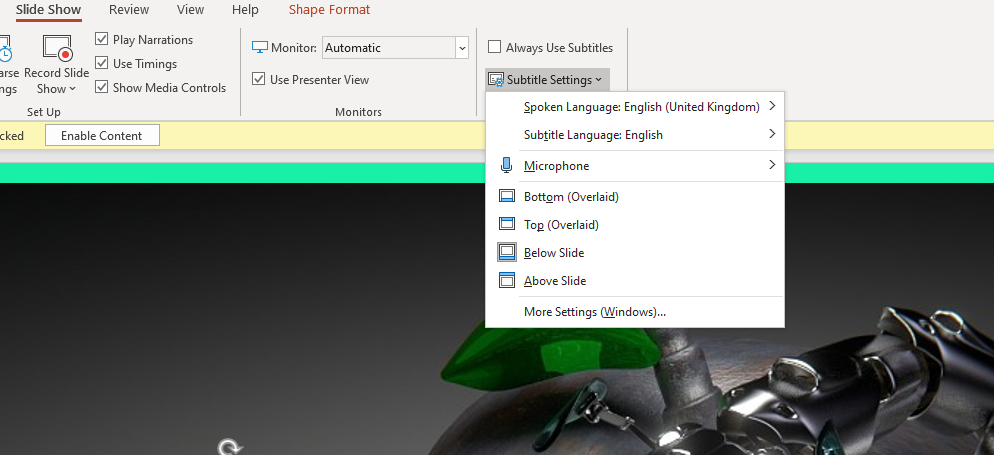
I don’t want to position myself as an expert on this but I do have advice on making your slides more accessible (thanks to Rachel fro the prompt!). The main thing is to use PowerPoint and turn on the subtitles function - if you’ve never used this you’ll be amazed at how well it works. PowerPoint provides subtitles of everything you say, as you say it. You can find the Settings for this in the Slideshow part of the menu:

The Subtitles function, found in ther Slide Show menu in PowerPoint

Otherwise all the normal rules apply.

  • Good contrast between font colour and background. It’s important to have plenty of contrast, for example black text on white background, so the text is easy to read. Purple on black for example doesn’t work. Related to this, don’t put text over a busy background.

  • Minimum font size of 24. Anything less than 24 risks being hard to read on a small screen; if you need the font smaller than 24 there’s probably too much information for one slide.

  • Use sans-serif fonts. Sans-serif fonts such as Calibri and Arial are better than Serif fonts such as Times New Roman or decorative / script fonts.

  • Don’t use colour as the only indicator of key information. You will almost always have at least one colour-blind audience member. It’s important to avoid using colour as the sole way of conveying information. For example, to have something shown in red to say stop doing it and something else in green to say start doing that, is not sufficient. Use the text, or a tick and cross or other non-colour-based-visual indicator, to ensure people understand what you’re telling them.

  • Repeat Chat questions back. This is good practice anyway: if someone asks a question in the chat, say it out loud for everyone to hear before answering it.


There’s lots more aspects of teaching online that others will be able to go into in more depth, but the 8 things above are, to my mind, key as we #PivotToOnline (as they say on twitter…) Good luck everyone!

Any questions, tips, comments, suggestions, advice? I’d love to hear it in the Comments.